Saturday, May 14, 2011

Oracle Advanced Compression

Oracle Advanced compression is a database option which from Oracle 11G finally getting to work in a more proper way than before. Oracle Advanced Compression can help you lower your storage costs by compressing the data in your database or as Oracle like to state it: "Advanced Compression, an option introduced in Oracle Database 11 g Enterprise Edition, offers a comprehensive set of compression capabilities to help organizations reduce costs, while maintaining or improving performance. It significantly reduces the storage footprint of databases through compression of structured data (numbers, characters) as well as unstructured data (documents, spreadsheets, XML and other files). It provides enhanced compression for database backups and also includes network compression capabilities for faster synchronization of standby databases."

Oracle advanced compression is a payed option in your database, for the latest pricing you can refer to the Oracle Global Pricelist which can be downloaded from the Oracle website. As this is a payed option you have to be sure that you will be able to get your return on investment before you begin. To be able to build a business case for purchasing Oracle Advanced Compression Oracle is providing us with some tools which you can run on your database to check the level of compression you can establish. The "compression advisor" which you can download at the Oracle website needs to be compiled into your database is providing you some basic information and still needs a lot of manual labor in running it on your entire database and after that some time needs to be spend on understanding and calculating the results before you can use them in your business case to validate your ROI of this database option.

For a resent project at Capgemini I have been developing a more robust and more usable implementation of the Oracle Compression Advisor in combination with a default calculation to calculate your ROI and helping you to generate a business case. If you are interested in looking into the options of Oracle Advanced Compression in your database, please feel free to contact me. The current version of the "Improved Compression Advisor" is currently still in testing at the moment I write this document and needs some manual steps of moving the results into excel however this is about to change within the coming weeks and it will most likely be placed online under a GNU/GPL license model.

For more information on advanced compression a large amount of information can be found online in the form of Documentation from Oracle also some good video's from speeches are posted online;  Christina Horsoe uploaded a video to vimeo with a presentation on a case study done by DSP. You can see the video below, the comment they provided to the video is the following. It is quite nice to have a quick look if you where not able to join the presentation yourself.

"Our case study is what the customer has termed a “Next Generation” Billing Project at a leading European Telecoms company. The system was required to consolidate billing in the 13 different countries around the world and needed to be available 24/7. . The database is multi-terabyte containing billions of Call Data Records.

The presentation will take a look at three significant challenges the project had to overcome and illustrate how that the Oracle Partitioning and the Oracle Advanced Compression Options’ was utilised to solve them. Oracle partitioning was used to partition the data simplifying the necessary archival process leading to £18,000 per month storage savings. Our performance challenge was met using partition pruning and also partition-wise joins, which led to performance improvements of over 100 times.

Finally, Oracle Advanced Compression was tested and proved to achieve storage saving of 2.8 to 1 resulting in a £77,000 saving in the first year."

OracleVideo has posted a short video on youtube which also is concerning Oracle Advanced Compression named "Storage Management with Oracle Database 11g"

If you are in need of more information or want to discuss more details and options on lowering your storage costs and implementing Oracle Advanced Compression please feel free to contact me via mail or send me a direct twitter message asking me to contact you.


Posted via email from Johan Louwers posterous page by Johan Louwers.

‪Google I/O 2011: Honeycomb Highlights‬

On the latest Google I/O conference Google launched some very nice new things. One of the main focus points of this latest conference had all to do with Android. Android's "Honeycomb" release includes a large number of new features, capabilities, and APIs to access them. This session gives a high-level view of everything that's new, with special focus on how this affects developers' lives and what they should be paying attention to. As to the nature of google they have provided a feed from the conference so everyone around the world could see the event as it was happing. In case you missed it below you can see one of the talks on the new Android Honeycomb.

Android 3.1 which is the new version of android is bringing some very nice new features for developers. I recently purchased a Android tablet to play around with and looking into the development guides and the information provided by Google this can become a very interesting time. The Android 3.1 platform adds refinements and new capabilities that developers can build on, to create powerful and engaging application experiences on tablets and other large-screen devices.

Tuesday, May 10, 2011

Oracle Metalink security considerations

Recently I found the below message on metalink, metalink is the support network from Oracle where you can get support on your questions and issues with Oracle software (and now also hardware). As it turns out people are trying to get access to the metalink accounts of companies to extract information about the systems and possible ways to gain access. In general the Oracle Support website is considered secure, you appoint a administrator within your organization and this person can authorize people to make use of the support network. Due to this people do tend to share information on this site which in general you would not state on the public internet and share with the rest of the world.

The below message is the message posted by Oracle on Metalink:


//--------------
Wikipedia defines social engineering as follows::
“Social engineering is the act of manipulating people into performing actions or divulging confidential information, rather than by breaking in or using technical cracking techniques. While similar to a confidence trick or simple fraud, the term typically applies to trickery or deception for the purpose of information gathering, fraud, or computer system access; in most cases the attacker never comes face-to-face with the victim. Social Engineering has also been employed by bill collectors, skiptracers, and bounty hunters.”

Oracle has become aware of an increasing number of attempts to get access to My Oracle Support by using social engineering techniques such as impersonating real users / employees of a company – but using a misspelled mail account domain (e.g., john.doe@oracle.com versus john.doe@0racle.com). By impersonating a real user, not only will the fraudulent user get unauthorized access to MOS, but would also be able to access the service requests of the targeted company, which may contain confidential information.

Because customer User Administrators are responsible for approving new users against their company CSI(s), they should be on alert for this growing threat and double-check all users they approve or have approved in the past. In addition, Oracle takes this threat very seriously and will disable any account / user that it identifies as impersonating someone else.

If – as a customer User Administrator – you identify but can’t disable a fraud user, please log a non-technical Service Request and Oracle Support will ensure proper actions are taken.

Thank you,
Your support team
//--------------

This brings me back on one of the topics I already have discussed internally a couple of times and with customers. What do you want to share with Oracle from a security point of view. Not only talking about what content do you discuss with a support engineer, also what do you have for example Oracle Enterprise Manager upload to Metalink. It is possible to connect Oracle Enterprise Manager to Metalink and have it share information about the systems you are running. This way it will show you information which it retrieves from Metalink on what patches might need to be applied and when you log a service request you can simply select the system you have a question about and the support engineer will have all the information at hand. In the below screenshot you can see how you can connect your Oracle Enterprise Manager. This is a screenshot of an older version, in the latest version some issues might arise. I have been looking into this together with Henk Nap who has posted some information on this on his weblog.

Connecting your systems bring two security risks into the equation. The first is already mentioned by Oracle, what if you post information to Metalink and someone gains access to your companies Metalink account. They will be able to read up on how you do your business and how your systems are configured. In some cases information you do NOT want to share. Second issue is, if you have your Oracle Enterprise Manager connecting to metaling you have to make this connection possible. That means opening some parts of your firewall. You can secure this however in my opinion opening your datacenter and connect it to the public internet, alway a bad idea. Until Oracle comes with some sort of more secure gateway, proxy or something else I am not a very big fan of connecting my systems to metaling directly.

Friday, May 06, 2011

Oracle eBS internet Explorer certification Matrix.

Sometimes I just have my blog to write reminders for myself (and for others) so they can quickly find some information on a specific topic. This is one of those posts. I am currently requested to look into the certification of systems used at a customer. One of the questions is if it is certified to upgrade Internet Explorer to version 9 in combination with Oracle e-Business Suite.


If you talk about Oracle e-Business Suite and browsers and java versions you tend to end up always on the weblog of Steven Chan. Also on the certification of Internet Explorer 9 for Oracle e-Business Suite steven has written a blogpost on his corporate Oracle blog. The latest (at this moment) post on this subject dates from 7-OCT-2010 and it states:


"IE 9 is available via a public platform preview today. We've been working with the latest IE9 beta, but it but hasn't been certified with the E-Business Suite yet."


As this is already a somewhat older blogpost I did a quick check with the people from Oracle and was directed to two metaling notes which provide a certification matrix for Oracle e-Business Suite.


Recommended Browsers for Oracle Applications 11i (Metalink Note 285218.1)

Recommended Browsers for Oracle Applications 12 (MetaLink Note 389422.1)


From the document you can cleary see that Oracle has NOT certified IE 9 at this moment. In the future please do refer to one of those two documents as they will be updated when things change.

Sunday, April 24, 2011

Upcoming market for indoor navigation

Nokia research labs recently launched a promotion video for a indoor navigation system. To be honest, even do the spread of blogposts and news items, this is not new. indoor navigation systems have been around for some time in both good and bad implementations. Some do work some do unfortunately work not so good. So what the big fuzz should be about is not the fact that Nokia is working on it, which is obviously and would be a suppress if they where not, the fuzz should be about that it is Nokia who is working on it and hopefully will make it to a product.

Reason that it is important that a company like Nokia is working on it is that it will be integrated in the new mobile products and that it most likely will trigger the competitors to also speedup the research on indoor navigation.


The next big thing could be indoor navigation. We have seen a giant step forward in outdoor navigation the past couple of years meanly due to the work done by TomTom, Garmin and Google. Google specially for creating Google maps and the integration into mobile phones and services. Applications, devices and all other kind of stuff is now location aware. Pictures taken with a mobile phone or a camera are now location aware and when you need to find your way around a city you can always rely on the navigation systems you carry in your pocket or which are integrated in your car.

Still a open field for improvement is when you are getting into a building a out of the reach of the GPS satellites. When you walk in an airport and need to find the way to, your gate, the toilet, a coffee corner, a shop, you have to turn to the old fashion of reading signs. When you are in a office you do normally not visit you have to find your way to the restaurant, the printer, the coffee corner, the desk of someone, a specific meeting room. When in a conference center you are always struggling to find your location.

Indoor navigation can make that a lot more easy. Imagine visiting the office of a customer for a project. In the beginning every consultant is struggling to find all kind of information to get started. Where do I find the printer room, where is this person located (and who is it), where can I find that conference room and where to grab a cup of coffee and a snack. This could all be resolved with indoor navigation. However this is also putting some stress on people maintaining the building. They will have to provide this information and specially in environments where people do not own their own desk it can be hard to keep track of who is sitting where.

For all those problems a solution can (and will) be provided in time and I strongly feel that indoor navigation will be the next big thing coming to the market. First as standalone apps created for airports and conference centers at a later stage for office buildings and shopping malls. At some point it will connect with social media networks to be able to share great indoor locations in somewhat the same way as you now see for outdoor locations with services like foursquare and similar services.

One big issue is that for indoor navigation you currently need a infrastructure to be able to do locate your position. You will need points in the building broadcasting a anchor point where for GPS you can make use of the satellites around the planet. This will slowdown the growth however it might be integrated with wifi spots. It would not come as a suppress to me if indoor navigation base stations will be in the future also broadcasting free (or commercial) WiFi.

Monday, April 11, 2011

google +1

The business Google is in is all about search and all about ranking the value of a page. This means it was only a matter of time before Google would show up with something like digg or a similar social bookmarking/ranking engine. This way google will not only be able to tell the people who use the search engine if the site they link to is interesting based upon a pagerank algorithm they are also able to check what the value of this site is based upon the social network of the person entering the search query.

In this form a social network will most likely be a little more wider than only the people you know and connect to with your Google profile. It will also include the people who have stated that they like the same pages as you do. This will possibly, read possibly, open a couple of new options for Google. They will improve their search and they expand the foundation for a social network. As we all know they are currently "at war" with Facebook and looking for ammunition.

This social bookmarking just came into beta testing and is called Google +1. In the below youtube movie you can see some more about this and who it works.


Google is running a site about the +1 option and this is telling us it will be available within search and within other websites on the web (not only google sites). So when it become available it will also be integrated into this weblog.


Saturday, April 09, 2011

oracle.ideimpl.webupdate.task.TaskFailedException

I recently tried to update my Oracle Jdeveloper installation with some updates coming from Oracle. You can update your Jdeveloper installation by clicking "help" - "Check for Updates". I needed to install some updates including the "AIA composite application framework version 2.4" update. When selecting it a process is started and after that you are requested to restart your Jdeveloper installation. This should complete the process and you should be able to use the new version. However due to some reason the new functionality was not installed. When checking for updates again I also found the "AIA composite application framework version 2.4" update still in the list of updates to be installed.

After some time I found that if I started Jdeveloper from the command line I could see a error messages stating the following: "oracle.ideimpl.webupdate.task.TaskFailedException: Unable to read /Users/suntac/.jdeveloper/tmp/update/oracle.aia.caf.jdevextension.2.4.zip". When jdeveloper downloads updates it is storing it under a tmp/update folder as a .zip file. Upon looking into this location I found that the file was empty.

Thanks to William from the Oracle jDeveloper support team I was able to download the file myself by hand. You can check manually all the updates at the "Oracle Extensions for Oracle JDeveloper Update Center" which is located at http://www.oracle.com/ocom/groups/public/@otn/documents/webcontent/131167.xml . Now when you download the file you can again start the "check for updates" option under the help menu however no pick the option to select from a local file.

At this screen you can select the location of the zip file you just downloaded. You will again be asked to restart jdeveloper and now you will notice that the file is installed without any issue.

Monday, March 28, 2011

Linux, check interface status

In some cases you might want to check the status of your network interfaces from a script. In a "normal" situation you can just run a ifconfig command and look if your interface is up or down however when you want to do this automated from within a script you do not want the complete output of ifconfig. You might just want a simple "up" or a simple "down" string returned. If you for example want to use this within a custom check in Nagios or Oracle Enterprise Manager.

You have some options, in the example below I will provide a "up" or a "down" string based upon the status of the interface. However you might also go for a even more simplistic way by returning a zero or one value. the script is based upon the fact that you will provide a parameter with the interface name, for example eth0 or en0. in case you provide a interface name that is none existing get a error message something like "ifconfig: interface eth0 does not exist". You can use the standard option to suppress this error message by using the default way to suppers stderr message by adding a "2> /dev/null" at the end of your script.


#!/bin/bash

IFCONFIG="/sbin/ifconfig $1"

ISIT=`$IFCONFIG | grep "UP" | wc -l`;

if test $ISIT -gt 0;
then
echo "up";
else
echo "down";
fi


Oracle OEM and User-Defined Metrics

When you are using a Oracle Enterprise Manager Grid Control approach within your Oracle landscape to monitor and maintain your application and database landscape you can make use of all kinds of predefined checks Oracle will provide you. Even do this is already a great library of important checks and alerts it can always (and will) happen that after some time you would like to extend the functionality. For example if you have build some custom applications you might want to have some checks in place to do some very specific checking on things that will only be applicable for your specific application. To enable you to create your own checks Oracle has provided the "User-Defined Metrics" UDM in short.

User-Defined Metrics can be build using SQL or using scripting languages such as bash. For now we will quickly focus on how to build a simple check with SQL. In the example below I will show how you can build a check on the number of invalid objects in your database.

The first thing you need to do is to find a way how you can achieve what you want via a SQL script. In case of the number of invalid objects you can use the query below;
SELECT
COUNT(1)
FROM dba_objects
WHERE status = 'INVALID'

Now we have to define the User-Defined metrics in Oracle Enterprise Manager. To do so navigate to "targets" -> "Databases". Below at the end of the page you will find a link "User-Defined Metrics" which will bring you to the page as show in the screenshot below.

You can see I have already created a couple of them. If you want to create a new User-Defined Metrics you can create one by using the "Create Like" button or the "create" button. We will be using the create button which brings you to the page shown below:

We will have to complete a couple of things, first we have to name the UDM. For now I have named it "TEST-invalid". The query is the same as the query shown above. Now we have to enter a username and password. I have used system for this. This might however not be the most optimal choice from a security point of view and you might run into some issues with the security department. What you might want to consider is creating a specific user for the checks to be executed however that is up to the security standards and compliancy you have to keep in mind in your specific environment.

In below screenshot we have to set some some more things. For example the thresholds. This will determine when to raise a warning or state a critical state. I have set in this example that if the value of the script is between 10 and 50 it will be a warning and if it is above 50 it will become critical. In the real world you do not want a single invalid object however this is to state what you can do with it. I have also set a alert message which will state in case of 15 invalid objects "uhoh 50 objects are wrong".

I have also stated that every 15 minutes the system will have to check. If you push test you will get the value and you will see if it is working. When you press OK the check will be created.

In our case 94 objects are invalid so now we can see it on the database page in Oracle Enterprise manager as you can see below. This is only a warning. You can automatilcy have script started and all kind of things however I will go into that at a later stage in another blogpost.

When you click on the message you will be able to see in more detail the current status and the history. This can be good to keep a close eye on your system and the trends in the system.

Wednesday, March 02, 2011

Solved: Logged in user does not have permission to access this page.

When you work with a new installation of the Oracle Install Base module you may encounter some issues when you try to enter a note. This is also encountered in some of the setup done for the vision installation of Oracle e-Business Suite Release 12. I encountered it during some tests of a R12 vision installation. The issue is that if you click "create" button in the notes page in Oracle Install Base you will get a error page stating "Logged in user does not have permission to access this page". No other explanation is given. Looking at metalink the following cause is given in note 455871.1 "The function JTF_CAL_FUNCTION_SECURITY is not added to Oracle Install Base Menu as a SubMenu.". This note is giving you a solution for release 11.5.10.2 and some hints for release 12.

As it turns out the note is not spot on for release 12. What you need to do to get it working for release 12 is the following:

Step 1:
- login to the system and select the system Administrator responsibility
- Go to "security" -> "responsibilities" -> "Define"
- query the Install Base responsibility which is giving you the issue
- copy the value of the "menu" field

Step 2:
- Within the system administrator responsibility go to "applications" and then "Menu".
- Query the correct menu by searching the "User Menu Name" which you retrieved from step1

Step 3:
Now you have to create a new submenu under the menu.
- Leave the "prompt" value blank
- Enter the value "JTF HTML Calendar-Tasks-Notes Function security menu" in the submenu field.
- Enter the value "JTF HTML Calendar Function Security" in the function field
- Save the new submenu

Step 4:
bounce the Apache server so the webserver cache is cleared.

Now you should be able to login to Oracle e-Business Suite and all should work. The change with the metalink note is the value that needs to be entered in the function field when creating a new submenu. The value stated in the metaling note will throw a error when done in a release 12 instance.

Friday, February 18, 2011

Excel Magic Quadrant

When you are working in the IT business you have come across the magic quadrants from Gartner. Gartner uses this way of visualizing prefects or vendors and giving them a place in the market. Gartner states the following about the magic quadrant: "Gartner's Magic Quadrant research methodology provides a graphical competitive positioning of four types of technology providers in fast-growing markets: Leaders, Visionaries, Niche Players and Challengers. For emerging or mature markets, Gartner's MarketScopes are the best tool to help clients understand how the status of an emerging or mature market aligns with their own state of maturity and future plans."

My personal opinion is that the magic quadrant is great to show the information in a single graph, and combined with the knowledge from Gartner and information from your own company you can make a solid decision as a CxO. However, the magic quadrant way of visualizing can be used for so much more than only they way Gartner is using it. I am currently falling inn love with this way of representing information and I recently started to use it to visualize for example the maturity of systems in combination with the business value they represent. This is working great during meetings as you can show a lot of systems in one graph in a way that is also understandable for none tech people.
The idea came after some talks on how to represent data in a none-tech way and we came up with a gartner magic quadrant way of representing the information. Considering you will most likely have only a limited number of tools on your laptop you will most likely be bound to the options to draw such a image in Microsoft powerpoint or to make a graph in Microsoft excel. I have used Microsoft Excel for this task because I could make a framework which can be used for all future graphs I will need. below I explained how this can be done, please note in the example I will be using Microsoft Excel 2011 (version 14.0.2 build 101115) on a mac. The point that it is on a mac will not be that hard to overcome, only the graphs look a little different however the 2011 part you might want to consider if something is not working as expected.


Step 1.
first step is to get your data in a correct format. if you like to create a framework for future use you might want to reserver some space in your sheet where you can enter the data. On the X axis you please reserver 2 columns for your data. one for the values of (in the example of a Gartner magic quadrant) "completeness of vision" and one for "Ability to execute" On the Y axis you can place the product/vendor names. Before you enter your data you should think about the scale of things, you want to have a pre-defined scale on which you will be plotting 0 till 10 might be a good option however you can pick any scale you like. I have picked 0 till 7 due to some internal metric which is based upon this scale. This way you should en up with a nice formatted place to store your data, something like the example below:

Step 2
Your second step would be to introduce a standard bubble chart. this is standard within excel, the thing you need to take into account is that you will need to do some extra setup when selecting your data. you need to create series for every line of data you created in step 1. If you would create a framework you can do a lookup to the cell for every value of the X and Y axis and the name. You will end up with something like the below example.
Step 3.
A bubble chart is by default using a automatic horizontal and vertical axis scale which you do not want to have in this example. You want to devoid your graph in 4 equal parts where everything below a certain figure is in a certain area of your graph so you have to unset the auto scale function on your axis. Tis can be done with the format axis option of your chart. It is advisable to set the max 1 point higher than the scale you defined in step 1 and the min one point lower. This ensures that a bubble which is on the lowest (or highest) part of your scale will not be shown half because it is falling of your plot area. In the below example you can see the settings for a scale 0 till 7. After you have set you scale you want to remove the axis from the plot area so you will not see it (or need it).
Step 4.
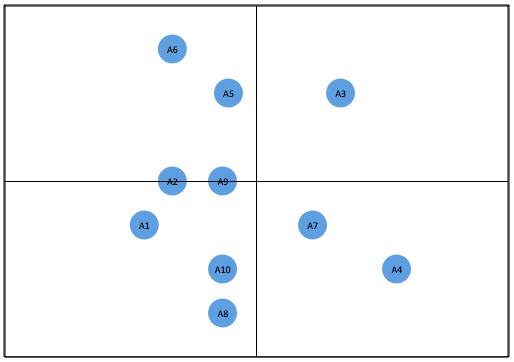
In principle your magic quadrant is now done. All you have to do is some design steps. You should remove the grid lines and draw a box around your plot area. After that you need to draw a cross with vertical and horizontal lines from the middle of your box. Now you can see the magic quadrant coming to what you expect of it. From a design perspective you might want to shrink the size of the bubbles and add labels to it and position them on the left, the right, the center or any other position in respect of the bubble you feel conferrable with. You might want to do all kinds of other design things however the result till now will look something like the below example:


Tuesday, February 08, 2011

solved: there are no valid navigations for this responsibility

Recently I tried to setup some roles for Oracle e-Business Suite (11.5.10.2) by using Oracle User Management. To be able to do so I granted myself the User management responsibility. However, when entering the responsibility I encountered a error stating "there are no valid navigations for this responsibility" as shown in the screenshot below.

As it turns out you need to do some other things when you want to grant yourself this responsibility You have to grant yourself the rights via user management by using the sysadmin account. It looks like a catch 22 however this is in a normal situation something you only need to do when you setup your system the first time and would like to make use of Oracle User Management. In a normal situation (not a test instance) you would provide one user the rights to access this and have this user propagate the rights to other users from within his account.

Looking At Oracle metalink you have to undertake the below steps and indeed, this is the solution for this issue;


1. Log into the applications as SYSADMIN User.

2. Choose User Management responsibility.

3. Navigate to Users web page.

4. Search and find the user you want to inherit the Security Administrator and Customer Administrator Roles.

5. Click on Update Icon.

6. Click on Assign Roles button.

7. Find and choose 'Security Administrator' Role.

8. Apply.

9. Repeat the Steps (6-8) for 'Customer Administrator' Role.

10. Log as the user who was assigned User Management Responsibility and facing the issue.

11. Retest the issue.

12. Migrate the solution as appropriate to other environments.

Monday, January 03, 2011

solve oracle error ORA-01999: password file cannot be updated in SHARED mode

sometimes under specific conditions you want to change the password of the Oracle database user sys. Their is however something special with the password for the sys user which might cause you to run into a ORA-01999 error. reason for this is that your database is using a REMOTE_LOGIN_PASSWORDFILE file and this file is set to SHARED. Shared means that one or more database can share the same password file which is for example used in a RAC setup. In my case it was NOT a RAC setup it was a standalone database. So if you want to change the sys password in that case you have to change the mode from SHARED to EXCLUSIVE.

Accoording to the Oracle documentation you have the following options:

# NONE: Setting this parameter to NONE causes Oracle Database to behave as if the password file does not exist. That is, no privileged connections are allowed over nonsecure connections.

# EXCLUSIVE: (The default) An EXCLUSIVE password file can be used with only one instance of one database. Only an EXCLUSIVE file can be modified. Using an EXCLUSIVE password file enables you to add, modify, and delete users. It also enables you to change the SYS password with the ALTER USER command.

# SHARED: A SHARED password file can be used by multiple databases running on the same server, or multiple instances of a Real Application Clusters (RAC) database. A SHARED password file cannot be modified. This means that you cannot add users to a SHARED password file. Any attempt to do so or to change the password of SYS or other users with the SYSDBA or SYSOPER privileges generates an error. All users needing SYSDBA or SYSOPER system privileges must be added to the password file when REMOTE_LOGIN_PASSWORDFILE is set to EXCLUSIVE. After all users are added, you can change REMOTE_LOGIN_PASSWORDFILE to SHARED, and then share the file.

The below example illustrates the error:

SQL> passw sys
Changing password for sys
New password:
Retype new password:
ERROR:
ORA-01999: password file cannot be updated in SHARED mode

Now we have 2 options to do solve this depending on the fact if your database uses a spfile or a pfile setup.

When using a spfile you can do the following:

SQL> alter system set REMOTE_LOGIN_PASSWORDFILE = 'EXCLUSIVE' scope=spfile;

When using a pfile you will have to vi the content of your pfile.

After the settings are picked-up by the database you can change your sys password.

solve ORA-00845: MEMORY_TARGET not supported on this system

I recently tried to start an "old" Oracle 11G database which was installed on a system I used for some other projects. Due to the other projects some settings to the operating system have changed.

When the database was started during the system boot I found an error on the console stating the following error:

ORA-00845: MEMORY_TARGET not supported on this system

It turned out that my tmpfs filesystem was to small for the original settings of my Oracle database. tmpfs is a common name for a temporary file storage facility on many Unix-like operating systems. It is intended to appear as a mounted file system, but stored in volatile memory instead of a persistent storage device. A similar construction is a RAM disk, which appears as a virtual disk drive and hosts a disk file system.

You can check your tmpfs mount with a simple df -h command like below (this is the state after the change):

[oracle@oem bin]$ df -h
Filesystem Size Used Avail Use% Mounted on
/dev/xvda2 4.1G 3.0G 1.1G 75% /
/dev/xvda1 92M 12M 76M 14% /boot
tmpfs 3.0G 1.2G 1.8G 41% /dev/shm
/dev/xvdb1 27G 13G 13G 49% /u01
[oracle@oem bin]$

It turned out the size was not 3.0G and it turned out that my database settings where set for a 2.0G system. You can check this by executing the following command's"

SQL>
SQL> show parameter MEMORY_MAX_TARGET;

NAME TYPE VALUE
------------------------------------ ----------- ------------------------------
memory_max_target big integer 2G
SQL> show PARAMETER MEMORY_TARGET;

NAME TYPE VALUE
------------------------------------ ----------- ------------------------------
memory_target big integer 2G
SQL>
SQL>

This shows we need at least 2.0G, to be sure I made my tmpfs 3.0G by editing my /etc/fstab file. Originally it looked like the one below:

[oracle@oem bin]$ cat /etc/fstab
LABEL=/ / ext3 defaults 1 1
LABEL=/boot /boot ext3 defaults 1 2
tmpfs /dev/shm tmpfs defaults 0 0
devpts /dev/pts devpts gid=5,mode=620 0 0
sysfs /sys sysfs defaults 0 0
proc /proc proc defaults 0 0
LABEL=SWAP-VM swap swap defaults 0 0
LABEL=oms /u01 ext3 defaults 1 2
[oracle@oem bin]$

You can change it to the example below so you will mount 3.0G:

[oracle@oem bin]$ cat /etc/fstab
LABEL=/ / ext3 defaults 1 1
LABEL=/boot /boot ext3 defaults 1 2
tmpfs /dev/shm tmpfs size=3000m 0 0
devpts /dev/pts devpts gid=5,mode=620 0 0
sysfs /sys sysfs defaults 0 0
proc /proc proc defaults 0 0
LABEL=SWAP-VM swap swap defaults 0 0
LABEL=oms /u01 ext3 defaults 1 2
[oracle@oem bin]$

Saturday, January 01, 2011

Oracle VM import template

When using the Oracle VM server to virtualize operating systems you have the option to download templates from Oracle at this edelivery site; http://edelivery.oracle.com/oraclevm . When you download a template you will have to place in the seed_pool directory which can be used by the Oracle VM Manager to use this template to create new virtual machines based upon this template.

If you place the template in the seed_pool location and you check the virtual machine templates screen of your Oracle VM manager you will not see the new template directly. I have just uploaded the OVM_EM_111 template however it is not visible. You will have to activate it first in your VM manager.

On this screen you can click the import function. This will present you the below screen. Here you will have a couple of options. As we have placed the template in our seed_pool directory we will select the option "select from Server Pool (Discover and register)". This will look into the seed_pool and query for all templates which have not yet been activated in the Oracle VM Manager. Other options are "Download from External Source (HTTP and FTP). This can be used in case you store your templates on a HTTP or FTP server somewhere else in your network. An other option is the P2V import function which will do a Physical to Virtual Migration, aka, making a none virtualized system a virtualized system.

When we select the option "select from Server Pool (Discover and register)" we will have to provide some information about the new template and the pool. First we have to select the server pool in which we have placed the template, in our case this is TestPool. This will present a list of none activated templates in the seed_pool directory of this server pool. So we select i our case the OVM_EM_111 template.

We have to state the operating system, a default username and a password and optional we can add a description. After clicking next you can review the information and confirm the operation.

You will now be able to see the new virtual machine OVM_EM_111 in your overview, first the status will be "Importing", for the seed_pool option this is a very short operation, HTTP/FTP will take some more time and P2V can take quite some time depending on the size of the machine. When imported the status will change to "Pending". This means the import has succeeded however you will have to approve the use of this template. You can see the "Approve" button active on the top of the templates.

When clicking on the approve button you will see the below screen where you can add some details and when clicking on the "Approve" button. This will make your template imported and activated/approved for use in the Oracle VM Manager console.

Final result is that you will now see you template active in the total list of templates which can be used.