The personal view on the IT world of Johan Louwers, specially focusing on Oracle technology, Linux and UNIX technology, programming languages and all kinds of nice and cool things happening in the IT world.
Tuesday, September 27, 2011
Oracle Fusion Stack
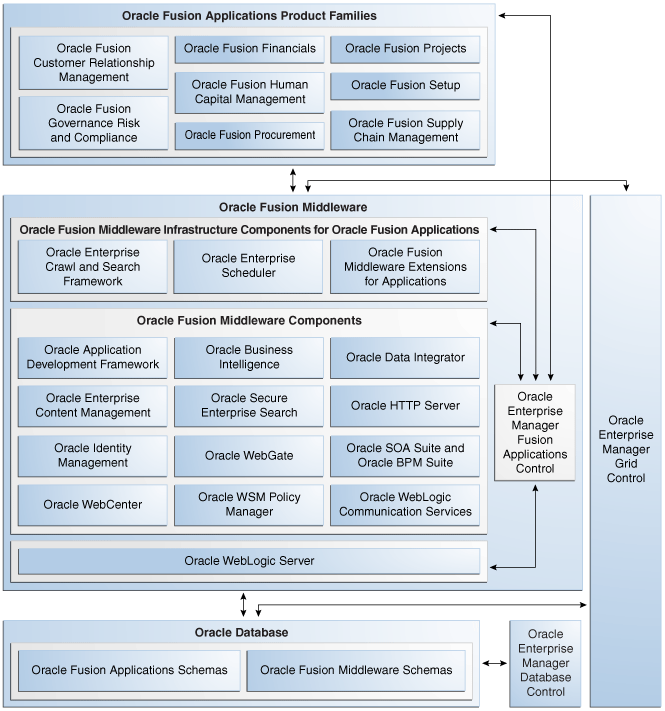
However, Oracle is releasing bits and parts of the Fusion stack, from a marketing purpose you can see this as smart, a buzz is created, or you can see this as a weakness, they start talking about something which is lacking shape at the moment they started talking about it. What a lot of people do not realize is that there is a lot Fusion out there, released possibly below the radar or people do not get the picture that it is part of the new Fusion stack. The below diagram holds a high level design of the Oracle eBS Fusion stack coming up from the database up till the functional modules. The picture is coming from the Oracle manual Oracle Fusion Applications Administrator’s Guide 11g Release 1 (11.1.1.5.0) launched as draft in April 2011. Even though it is confidential officially some people have released it to the public. Thanks to the people at orastudy.com we are able to take a peak in the draft version, you can have a look at the manual at Scribd.com and you can read it as a embedded document from Scribd.com at the end of this blogpost.
Looking at the picture below you can get a glimpse of the stack which to which Oracle refers to as the Fusion stack. At the top we have the Oracle Fusion Application Product Families who consist out of a lot of Oracle e-Business Suite applications and modules and will be the new core of the Oracle Fusion applications. You can see the Oracle Fusion Middleware stack, I will be spending some blogpost in the upcoming time on them to explain them in more detail, you can see that most of this is based upon the Oracle Weblogic Server which is not a surprise to most of you.
From a application point of view Oracle is dividing the applications in a couple of clustered which I will blog about more in the upcoming posts. Below you can see them in a slide from a Oracle presentation. To name them; Oracle Fusion Financial Management, Oracle Fusion Human Capital Management, Oracle Fusion Supply Chain Management, Oracle Fusion Project Portfolio Management, Oracle Fusion Procurement, Oracle Fusion Customer Relation Management and Oracle Fusion GRC or in full Oracle Fusion Governance, Risk and Compliancy.
As you can notice a great place is reserved in the stack for Oracle Enterprise Manager, this is a great part of the monitoring and maintenance stack from Oracle. What is missing in this picture is the hardware component of Oracle Enterprise Manager which has been added after the acquisition of Sun Microsystems and also the creation of the ExaData and ExaLogic machines. Oracle is now able to monitor all parts of the stack which includes both hardware and software.
e14496
Saturday, September 10, 2011
Oracle Enterprise Manager Cloud Management
Friday, August 05, 2011
Hacking from China
A very interesting whitepaper on security and hacking done by China (to be believed). I think this whitepaper is a very good read to get some more understanding in the basics of the role of china in the world of today.
"Starting in November 2009, coordinated covert and targeted cyberattacks have been conducted against global oil, energy, and petrochemical companies. These attacks have involved social engineering, spearphishing attacks, exploitation of Microsoft Windows operating systems vulnerabilities, Microsoft Active Directory compromises, and the use of remote administration tools (RATs) in targeting and harvesting sensitive competitive proprietary operations and project-financing information with regard to oil and gas field bids and operations. We have identified the tools, techniques, and network activities used in these continuing attacks—which we have dubbed Night Dragon—as originating primarily in China. Through coordinated analysis of the related events and tools used, McAfee has determined identifying features to assist companies with detection and investigation. While we believe many actors have participated in these attacks, we have been able to identify one individual who has provided the crucial C&C infrastructure to the attackers."
swarm computing
"Computing is rapidly moving away from traditional computers.Of the 8 billion computing units will be deployed worldwide this year, only 150 million are stand-alone computers.Many programs in the future will run on collections of mobile processors interacting with the physical world and communicating over dynamic, ad hoc networks.We can view such a collection of devices as aswarm.As with natural swarms, such as a school of fish or an ant colony, the behavior of the swarm emerges from the simple behaviors of its individual members.The swarm is resilient to a small fraction of misbehaving members and to changes in the environment."
Swarm Computing
Also a very interesting source is this presentation from Oracle on swarm computing: http://www.infoq.com/presentations/Swarm-Computing
Monday, July 25, 2011
connect Oracle Linux to the public yum server
Oracle is providing to options, for corporate users you can connect to the Linux Support program by paying a fee towards Oracle. If you are not and just using the system for your home server for example you can connect to the public YUM server from Oracle. To be able to connect your system to the public yum server you have to simply take the following action:
# cd /etc/yum.repos.d
# wget http://public-yum.oracle.com/public-yum-el5.repo
After this you have to open the downloaded file in vi and make sure that you enable the channels you want to use for updating from the public Yum server. To enable one you have to set enabled=1 instead of enabled=0.
now you use the yum command to upgrade, update and install new software to your system. The great plus for Yum is that dependencies are taken care of and downloaded and installed when needed instead of turing your day into a dependency solving nightmare.
Friday, July 22, 2011
Oracle hardnofiles softnofiles resolved
The failed check during installation will look something like the one below;
Checking for hardnofiles=4096; hardnofiles=1024. Failed <<<<
Checking for softnofiles=4096; softnofiles=1024. Failed <<<<
you can resolve this by setting a new limit for the user who will be installing and running the software (most likely the user Oracle) or by setting it system wide. To set it system wide you have to edit the file /etc/security/limits.conf and add the following lines to it;
* soft nofile 65536
* hard nofile 65536
you can change 65536 to any value you think is needed. If you do not want to make it a system wide value and have it set for a specific user you can change * for the username you want to set it for. For example change * for oracle and this value will only be set for Oracle.
Oracle database failed prerequisite

Something new is that you will now have an option to have some of those fixed automatically. Click the "Fix & Check Again" button and you will see that a script named runfixup.sh is created under /tmp/.... you have to run this as root and this will solve some of your issues. This is much more easy than setting all the kernel parameters by hand.
[root@OEM CVU_11.2.0.1.0_oracle]# ./runfixup.sh
Response file being used is :./fixup.response
Enable file being used is :./fixup.enable
Log file location: ./orarun.log
Setting Kernel Parameters...
kernel.sem = 250 32000 100 128
fs.file-max = 6815744
net.ipv4.ip_local_port_range = 9000 65500
net.core.rmem_default = 262144
net.core.wmem_default = 262144
net.core.rmem_max = 4194304
net.core.wmem_max = 1048576
fs.aio-max-nr = 1048576
uid=500(oracle) gid=500(oinstall) groups=500(oinstall),501(oper),502(dba)
[root@OEM CVU_11.2.0.1.0_oracle]#
Even do this is quite quick it is always good to know how this can also be done by hand, so do it also every now and then by hand just to keep your knowledge of Linux up to date.
Wednesday, July 20, 2011
X11 forwarding on a mac
(0)Insert your Mac OS X install disc. (If you have two discs it will be the "Install Disc 1")
(1)In the window that pops up double click on "Optional Installs" (You may need to scroll down)
(2)In the new window that pops up double click on "Optional Installs.mpkg"
(3)In the installation window click Continue.
(4)Read through the License Agreement and choose Continue if you agree.
(5)Click the triangle next to "Applications" in order to expand the directory.
(6)Put a check in "X11".
(7)Click Continue.
(8)Click Install.
(9)Wait for the installation to complete and then click Close when it is complete.
Now we have set this up you can connect to a remote linux server as done in the example below.
johan-louwerss-macbook-pro:~ jlouwers$ ssh -X root@192.168.1.20
root@192.168.1.20's password:
Warning: untrusted X11 forwarding setup failed: xauth key data not generated
Warning: No xauth data; using fake authentication data for X11 forwarding.
Last login: Wed Jul 20 15:10:28 2011 from 192.168.1.106
/usr/bin/xauth: creating new authority file /root/.Xauthority
[root@OEM ~]#
You will see some error messages and a message stating the a new authority file is created. So the next time we login the message will look a little different;
johan-louwerss-macbook-pro:~ jlouwers$ ssh -X root@192.168.1.20
root@192.168.1.20's password:
Warning: untrusted X11 forwarding setup failed: xauth key data not generated
Warning: No xauth data; using fake authentication data for X11 forwarding.
Last login: Wed Jul 20 20:10:54 2011 from 192.168.1.106
[root@OEM ~]#
Some of the warnings are still their however for the functionality you can ignore them. You can work on them to resolve it however I will not be covering this in this blogpost. If you now execute the command clock or xlogo you will see a the X application starting at your local machine while it is running on the machine you just connected to.
This forwarding is used for X applications running on some server which is not having a terminal or to which you have no direct access and for example need to do a installation. Downside of using this is is that if your connection brakes your application gets killed which can be an issue when you do a installation so in those cases you might want to look into other options to forward the screen to your local machine.
Oracle mobile project management
Why is the mobile option such a big deal? When you are working on a project, or in my case on multiple projects the same time you most likley will be running from place to place and you are always in need of the latest information. This is why I love e-mail on my mobile, you can send and read your mail always on the go and now you also have the option to look into the details of a project and add information to the project. This is especially handy when you are commuting daily by train and have some time on your hands while waiting for the train to come or when you are on the train. Making things more mobile and available always, everywhere and on all devices is in my personal opinion the way to go forward.
We will see this trend picking up in the upcoming years and I expect that we will see more and more applications in the business area adding a mobile part to it. For some companies this will not be a very big plus however for most companies this is a very big thing and it will help you as a employee to work always and everywhere you want. The new applications from Oracle do have a native app for the iPhone and the iPad and do have options to connect to other mobile devices, for example Android, by making use of a mail interface. If you would like to view the presentation please refer to the Oracle site at this location.
The transcript of the presentation reads:
The latest release of Primavera P6 Enterprise Project Portfolio Management offers many significant enhancements, including a new iPhone app and a streamlined architecture that enables companies to more effectively plan and operate business processes.
The new release’s integration with e-mail and smart phones improves communication among project managers, schedulers, and field personnel to ensure that projects stay on track and delays are minimized. Teams can comment on tasks via e-mail, view project to-do lists, and distribute photos via their mobile devices.
Other key benefits allow organizations to
* Unite project teams and stakeholders with a host of collaboration and feedback capabilities
* Reduce the risks of cost and schedule overruns
* Better optimize resources for maximum ROI
* Clearly monitor and visualize project performance versus plans to help workgroups achieve project commitments
The new release is designed for easy scalability—to aid a single person overseeing a small project, or tens of thousands of users engaged in millions of complex activities across hundreds of projects. And the application’s role-based capabilities address each team member’s needs and responsibilities. For example, senior managers can view real-time performance summaries for the organization while interactive dashboards, Web applications, and simple forms help workers across all levels easily communicate status updates and issue scope changes.
Interactive activity Gantt charts allow planners, schedulers, and project managers to communicate a more accurate and complete graphical representation of a project’s schedule. Top-down or bottom-up resource requests and staffing processes help groups match the right people with projects. And finally, calendar and activity network views provide team members with a clear view of ongoing assignments.
I you like to see the presentation slides without the audio and just want to have a quick look please check the document below;
iPhone App Oracle's Primavera P6
Posted via Johan Louwers his Posterous page to his blogger page.
Sunday, July 17, 2011
Connecting in the cloud
People are still concerned about the multi tenancy as this is in conflict with all that has been IT for the past years. However we now see that companies start to make the move. This is a smart move and solves a lot of issues however it is also introducing some new issues. To be honest, those issues where already their in the past however now they are more clear. In none cloud landscapes you had the problem of systems that where not connected now we have the issue of clouds which are not connected. HOwever we are currently at another level of thinking. People are more into the SOA way of thinking and the SOA in the cloud way of thinking.
What we now see is that new solutions are coming to the market which help customers connect clouds. This is a great way forward and we will see a lot of companies picking up speed in this area. One example video from Capgemini is below which I personally think is a great way of looking at the issue and dealing with it. Capgemini Immediate is helping you with some of those issues.
Posted via Johan Louwers his Posterous page to his blogger page.
Monday, July 11, 2011
Thursday, June 30, 2011
Oracle VM and MySQL templates
Oracle has released a new press release which is stating a new Oracle VM template. They now have created a Oracle VM template which is based on Oracle Linux and will be running a Oracle MySql Enterprise version. This will provide the MySQL community in a even more relaxed position now they can simply provision complete MySQL installations on a Oracle VM platform. In my opinion this is a great move from Oracle to get (A) MySQL more in the picture within the Oracle community itself and (B) provide a even wider adoption of Oracle VM and Oracle Linux now they are expanding it to the MySQL groups within the Oracle community.
The press release can be found at the Oracle site and you can read a part of it below:News FactsEnabling more efficient and lower cost deployments of virtualized MySQL environments, Oracle today announced the first Oracle VM Template for MySQL Enterprise Edition.
The new Oracle VM Template for MySQL helps eliminate manual configuration efforts and risks by providing a pre-installed, pre-configured and certified software stack that includes Oracle VM Server for x86, Oracle Linux with the Unbreakable Enterprise Kernel and MySQL Enterprise Edition.
By pre-integrating the world’s most popular open source database with Oracle Linux and Oracle Virtualization technologies, enterprise users and ISVs can quickly and easily deploy and manage a virtualized MySQL database server for Web and cloud-based applications.Backed by Oracle’s world-class support organization and the result of extensive integration and quality assurance testing, the Oracle VM Template for MySQL Enterprise Edition further demonstrates Oracle’s investment in MySQL and allows users to benefit from a single point of contact for 24/7 technical support for all pre-configured components.Delivers Pre-Installed, Pre-Configured and Fully Integrated Virtualized Software Stack
Oracle VM Templates greatly simplify installation, configuration and ongoing maintenance operations, allowing organizations to achieve faster time to market and to reduce costs.
Using the Oracle VM Template for MySQL Enterprise Edition to deliver applications allows users to benefit from:
Faster deployments: Users can drastically reduce installation and configuration cycles both for initial deployments and to provision replicated scale-out environments.
Increased reliability: Using a pre-installed and pre-configured software stack, that has already undergone extensive integration and quality testing and is certified for production use, helps ensure a reliable and trusted environment.
Higher uptime: With MySQL’s replication capabilities plus Oracle VM’s built-in high availability features both planned and unplanned downtime can be reduced.
To further support the cost-effective delivery of high-performance web-based applications, the new Oracle VM Template for MySQL Enterprise Edition also provides users with access to the comprehensive suite of MySQL management tools including MySQL Enterprise Monitor, MySQL Query Analyzer, MySQL Workbench, and MySQL Enterprise Backup.
Oracle VM Templates are also available for Oracle Applications, Oracle Fusion Middleware, Oracle Database, Oracle Linux, Oracle Solaris and other Oracle products.
Supporting Quote
"Oracle is committed to helping MySQL users more efficiently deploy and manage high-performance web and cloud-based applications at a lower cost,” said Tomas Ulin, vice president MySQL Engineering, Oracle. “With the introduction of the first Oracle VM Template for MySQL Enterprise Edition, customers can benefit from a fully integrated solution that is backed by Oracle’s world-class support, enabling faster deployments, increased reliability and higher uptime for MySQL applications in virtualized environments.”
Posted via Johan Louwers his Posterous page to his blogger page.
Thursday, June 16, 2011
Generate QR codes with google API
QR codes are used more and more in all kind of applications, where the barcode was used primarily to identify stuff, for example in a logistics system you now see QR codes coming up in all kind of B2C and C2C applications besides only B2B. Reason for this is that most people are now getting the hang of working with smart-phones which are equipped with camera's and free apps can be downloaded to understand the QR code.
You now see Qr codes coming to magazines where you can use your smartphone to go to a specific website for example. Or you can see QR codes on posters int he city, as a extra information link on tickets, in books… the options for which you can use QR codes are almost endless, not only towards customers but also within business applications.
Another reason that QR codes are coming so popular is that you can store a "large" amount of data in a QR code which you could not easily do with a barcode. You can store up to 7089 numeric code characters in a QR code or 4296 alphanumeric characters or 2953 bytes (binary 8 Bit) or 1817 Kanji or Kana characters (Kanji - chinese characters used in Japanese writing / kana - japanese characters) . for a small image that is a large amount of data and with the correct application and the correct mindset you can do a lot with this.
So all find and good,… how do you generate this mess of pixels? You can find a lot of OpenSource applications and libraries you can use to generate a QR code. However if you want a quick solution you can use the Google Chart API to generate it for you. Google is providing a way to request a QR code via a URL pointing towards the chart API.
The base URL for this part of the chart API is https://chart.googleapis.com however this will redirect you to the google search main page if you are not proving some parameters.
First you have to extend it with "/chart?" this will make the URL https://chart.googleapis.com/chart? which is still not very good and will not give you a QR code. secondly you have to play with a couple of parameters.
cht
Must be set to qr, meaning it will look like cht=qr
chs
This states the size of the QR code.
chl
This parameter is holding your data for example if you want to have "abc23" in the QR code your parameter should look like chl=abc123
choe
This indicates the encoding of the data in the QR code. You can pick UTF-8, Shift_JIS or ISO-8859-1. If not provided UTF-8 is used
child
This indicates the level of correction. You can enter the following values for this parameter (if not provided L is used):
L - [Default] Allows recovery of up to 7% data loss
M - Allows recovery of up to 15% data loss
Q - Allows recovery of up to 25% data loss
H - Allows recovery of up to 30% data loss
so, lets say you want to have a QR code with the text "abcdef123456" in a UTF-8 format and a size of 50X50. for this you will have to use the following URL:
https://chart.googleapis.com/chart?cht=qr&chs=50x50&chl=abcdef123456&choe=UTF-8
this will produce the following QR code:
If you for example want to change the size to 100 by 100 you can change the URL to: https://chart.googleapis.com/chart?cht=qr&chs=100x100&chl=abcdef123456&choe=UTF-8 to create this image:
If you play around with the parameters you will see you can have a lot of fun with it and quickly create QR codes without the need to build a custom (or install) application to create QR codes for you. You can even use the URL to automatically download the pictures for with for example a wget in a bash script.
Saturday, June 11, 2011
Solved: Maximum execution time exceeded file.inc on line 934
Some people at Harvard University have greeted a template extension on the basic Drupal installation named OpenScholar. OpenScholar is intended to provide people with a Drupal installation which can be used to host a website for professors and research groups primarily. Looking at the templates they have build I wanted to give it a go. The installation is basically the same as that of standard Drupal. During installation of OpenScholar I encountered a issue which is also in some cases seen when you install Drupal itself. After the first installation page your webserver comes back with a empty page, looking at the HTML source code of the "empty" page it turns out the following error message is thrown:
Fatal error: Maximum execution time of 65 seconds exceeded in /public_html/includes/file.inc on line 934
The maximum exception time is set in your PHP configuration, this indicates the amount of seconds that a script can take to complete its task. You can resolve this by simply changing the value to something higher. Issue with this is that if you are on a hosted environment, like at a hosting provider, you will not have the option to change this value as it is set for all users on that webserver. Some options are available to you however. First is, you can add a setting to your local .htaccess file where you can change it for that specific directory. You have to add a php_value max_execution_time to this file. Secondly you can initiate a override in your PHP code itself.
However, most hosting providers will have set a setting preventing such overrides in their main PHP configuration. This is a simple and good approach from a hosting provider point of view. This is preventing certain user to consume all CPU power with bad code. For most users those options will not be valid as was in my case as I installed it not on my own server and was trying to install it on a server at a hosting provider.
Meaning we have to look into other options to resolve this issue. Looking at the code we found that the issue is coming from a part of the code that is checking the files on the file system to verify that all files needed for the installation are present. This scanning of the filesystem in some cases take more time than the time set for the max execution time. With some help from Sam Adams and his postings on acquia.com forums I found that you can prevent this scan from happening by hacking the install.inc file. What you have to do is open the file in VI and change the following line:
$installs = drupal_get_install_files($module_list);
into this:
$installs = array();
This will populate the variable $installs with a empty array and it will not call drupal_get_install_files with a list of modules to be checked. After making this change the installation go's without any issue.
Posted via Johan Louwers his Posterous page to his blogger page.
Thursday, June 09, 2011
Solved: oracle XE web-interface not working
After shutting down the laptop and starting it again the next day for some reason the web interface was not working. Connecting to http://localhost:8080 was resulting in a 404 error page meaning the page could not be found.
After some looking into my listening ports I found that no service was listening on port 8080. Checking the Oracle database listener gave the first clue:
LSNRCTL> status
Connecting to (DESCRIPTION=(ADDRESS=(PROTOCOL=IPC)(KEY=EXTPROC_FOR_XE)))
STATUS of the LISTENER
------------------------
Alias LISTENER
Version TNSLSNR for Linux: Version 10.2.0.1.0 - Production
Start Date 09-JUN-2011 11:10:25
Uptime 0 days 0 hr. 12 min. 30 sec
Trace Level off
Security ON: Local OS Authentication
SNMP OFF
Default Service XE
Listener Parameter File /usr/lib/oracle/xe/app/oracle/product/10.2.0/server/network/admin/listener.ora
Listener Log File /usr/lib/oracle/xe/app/oracle/product/10.2.0/server/network/log/listener.log
Listening Endpoints Summary...
(DESCRIPTION=(ADDRESS=(PROTOCOL=ipc)(KEY=EXTPROC_FOR_XE)))
(DESCRIPTION=(ADDRESS=(PROTOCOL=tcp)(HOST=127.0.0.1)(PORT=1521)))
Services Summary...
Service "PLSExtProc" has 1 instance(s).
Instance "PLSExtProc", status UNKNOWN, has 1 handler(s) for this service...
The command completed successfully
the status command within lsnrctl stated clearly that PLSExtProc was having some trouble. Issue is that if you configure your machine to make use of DHCP and do not state a hostname and you come to a network where the DHCP server will provide you with a hostname the hostname is not matching with the hostname set during the installation of the Oracle XE database.
Solution to this is to state a hostname and do not let your DHCP server push one towards you. After changing this you have to change the content of listener.ora and tnsnames.ora to make sure the hostname matches with the newly entered hostname. When done do a force-reload (or stop and start) of /etc/init.d/oracle-xe.
When you have done those steps you can request the status again via lsnrctl and you will see something like the below outcome. You can also open a browser and connect to localhost:8080 and you should see the web-interface. a.k.a. Problem solved.
LSNRCTL> status
Connecting to (DESCRIPTION=(ADDRESS=(PROTOCOL=IPC)(KEY=EXTPROC_FOR_XE)))
STATUS of the LISTENER
------------------------
Alias LISTENER
Version TNSLSNR for Linux: Version 10.2.0.1.0 - Production
Start Date 09-JUN-2011 11:28:44
Uptime 0 days 0 hr. 0 min. 9 sec
Trace Level off
Security ON: Local OS Authentication
SNMP OFF
Default Service XE
Listener Parameter File /usr/lib/oracle/xe/app/oracle/product/10.2.0/server/network/admin/listener.ora
Listener Log File /usr/lib/oracle/xe/app/oracle/product/10.2.0/server/network/log/listener.log
Listening Endpoints Summary...
(DESCRIPTION=(ADDRESS=(PROTOCOL=ipc)(KEY=EXTPROC_FOR_XE)))
(DESCRIPTION=(ADDRESS=(PROTOCOL=tcp)(HOST=johanlinux.capgemini.nl)(PORT=1521)))
(DESCRIPTION=(ADDRESS=(PROTOCOL=tcp)(HOST=127.0.0.1)(PORT=8080))(Presentation=HTTP)(Session=RAW))
Services Summary...
Service "PLSExtProc" has 1 instance(s).
Instance "PLSExtProc", status UNKNOWN, has 1 handler(s) for this service...
Service "XE" has 1 instance(s).
Instance "XE", status READY, has 1 handler(s) for this service...
Service "XEXDB" has 1 instance(s).
Instance "XE", status READY, has 1 handler(s) for this service...
Service "XE_XPT" has 1 instance(s).
Instance "XE", status READY, has 1 handler(s) for this service...
The command completed successfully
LSNRCTL>

