Showing posts with label backup. Show all posts

Wednesday, October 22, 2014

Zero Data Loss Recovery Appliance

During Oracle Openworld 2014 Oracle released the Zero Data Loss Recovery Appliance as one of the new Oracle Engineered Systems. The Zero Data Loss Recovery Appliance is an Oracle Engineered System specifically designed to address backup and recovery related challenges in the modern database deployments. It is specifically designed to ensure that a customer can always perform a point in time recovery in an always on economy where downtime result directly in loss of revenue en the loss of data can potentially result in bankrupting the enterprise.

According to the Oracle documentation the key features of the Zero Data Loss Recovery Appliance are:
  • Real-time redo transport
  • Secure replication
  • Autonomous tape archival
  • End-to-end data validation
  • Incremental-forever backup strategy
  • Space-efficient virtual full backups
  • Backup operations offload
  • Database-level protection policies
  • Database-aware space management
  • Cloud-scale architecture
  • Unified management and control 
According to the same documentation the key benefits of the Zero Data Loss Recovery Appliance are:
  • Eliminate Data Loss
  • Minimal Impact Backups
  • Database Level Recoverability
  • Cloud-scale Data Protection
Even though the Zero Data Loss Recovery Appliance brings some nice features and the key benefits and key features Oracle states in the documentation are very valid the main point is not broadcasted in the documentation. The mentioned points are in many enterprises already available in the form of self build solutions based upon a number of solutions from vendors. Backup software is in most cases Oracle RMAN or a combination of Oracle RMAN and a third vendor software solution. Hardware is commonly from different vendors, a vendor for the server hardware, a vendor for the storage and a vendor for the tape appliances.

One of the main benefits of introducing the Zero Data Loss Recovery Appliance is that it provides the perfect leverage to ensure that all backup and recovery strategies are standardized and optimized in an Oracle best practice manner. In most enterprise deployments you still see that backup and recovery strategies differ over a wide Oracle database deployment landscape.

It is not unseen that backup and recovery strategies involves multiple teams and multiple tools and scripts and that multiple ways of implementation are used over time. By not having an optimized and standardized solution for backup and recovery organizations do not have the ability to have an enterprise wide insight in how well the data is protected against data loss and a uniform way of working for recovery is missing. This introduces the risk that data is lost due to missed backups or due to a non compatible way of restoring.

In the below diagram a dual datacenter solution for Zero Data Loss Recovery Appliance is shown in which it is connected to a Oracle Exadata machine. However, all databases regardless of the server platform they are deployed on can be connected to the Zero Data Loss Recovery Appliance.
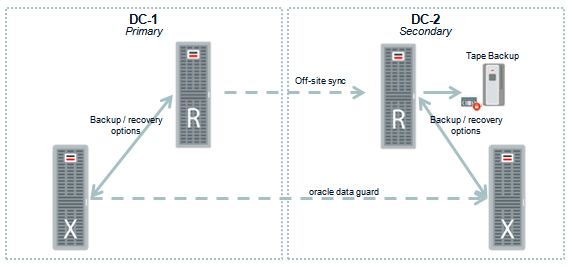

When operating a large enterprise wide Oracle landscape customers do use Oracle Enterprise Manager for full end-to-end monitoring and management. One of the additional benefits of the Zero Data Loss Recovery Appliance is that it can fully be managed by Oracle Enterprise Manager. This means that the complete management of all components is done via Oracle Enterprise Manager. This in contrast to home grown solutions where customers are in some cases forced to use management tooling for all the different hardware and software components that make the full backup and recovery solution.

For more information about the Zero Data Loss Recovery Appliance please also refer to the below shown presentation.


Saturday, April 19, 2014

Oracle Database Backup Service explained

Oracle databases are commonly used for mission critical systems, in many cases databases are configured in a high availability setup spanning two or more datacenters. Even though a dual or triple datacenter is protecting you against a number of risks, like for example a fire in one of the datacenters it is not excusing you from implementing a proper backup and recovery strategy. In cases where your data is corrupted or for any other reason you need to consult a backup you will most likely rely on Oracle RMAN. RMAN used the default way for backup and recovery and ships with the Oracle database.

The below diagram shows a proper way of conducting backups. In this case all the data in database A and B is written to the tape library in another datacenter. Databases C and D write the data to the other datacenter. This ensures that your data is always at two locations. If for some reason datacenter-1 should be considered a total loss you can still recover your data from the other datacenter. For mission critical systems you most likely also will have a standby database in the other datacenter however this is not included in this diagram.

Even though this is considered a best practice it is for some companies a costly implementation. Specially smaller companies do not want to invest in a dual, or even triple, datacenter architecture. For this reason you commonly see that the data is written to tape in the same datacenter as the database is hosted and that a person is collecting the tapes on a daily basis. Or, in some worst case scenarios the tapes just reside in the same datacenter. This holds that in case of a fire the entire data collection of a company can be considered lost.

Oracle has recently introduced a solution for this issue by adding a cloud backup service to its cloud services portfolio. The Oracle database backup cloud provides an option to keep using your standard RMAN tooling, however instead of talking to a local tape library, or one in another datacenter, you will be writing your backup to the Oracle cloud. This cloud service, named Oracle Database Backup Service requires you to install the Oracle Database Cloud Backup Module on your database server. You can use the installed module as a RMAN channel to do your backup. By using encryption and compression you can ensure that your backup is send quickly and secure to the Oracle backup Service.


The above diagram shows the flow used in case you backup to the Oracle database backup service. This model is working when you have, for example, only a single datacenter. However it can also work as a strategic model when you have multiple datacenters and even if you have mixed this with cloud based hosting.

The above diagram shows how you can use the Oracle database backup service to do a cloud to cloud backup. If you, for example, host your database at Azure or Amazon and you would like to backup your data at the same backup service providers as all your other datacenters are using. Or you want to have it at Oracle to ensure your data is not with one single company, you can use the same mechanism to perform the backup to the Oracle Database Backup Service.

Creating an account at Oracle and ordering backup space is easy and can be done completely online. As you can see from the screenshot below you can order per terabyte of backup space.


One thing you have to keep in mind, as with all cloud based solutions. There are some legal considerations you need to review. When using the Oracle Database Backup Service you are moving your data away from your company and into the trust of another company. Oracle has provided numerous security options to ensure your data is safe, however, from a legal point of view you have to be sure you are allowed to move the data into the trust of Oracle. For most US based companies this will not be an issue, for US based government agencies and non-US companies it is something you might want to check with your legal department, just to be sure.

Wednesday, June 10, 2009

Oracle Database Cloud Backup

When you are looking into the architecture of a new database system a lot of things are to be considered. Besides the applications that will be using the database you will have to think about hardware, networking, storage, failover systems, backup and recovery, etc etc etc.

Traditional backup is done in many cases on tape, when disks and storage appliances came into play and became cheaper backups started to be done on disk arrays. Network attached storage is currently a commonly used way to store backups, in most cases combined with tape storage to move backups to another location. Some companies use mirror filers to store backups on other locations and/or standby in case a failover should become active.

All options are still very useful and in some situations still the best however now we have a new and very good option, and it is still a very affordable solution. Oracle is providing a solution to store your backups in the cloud, in cooperation with Amazon it is now possible to use RMAN to backup your database into the storage cloud of Amazon. As part of the cloud computing solutions Amazon provides the also provide Amazon S3 (Amazon Simple Storage Solution).

Instead of using a tape to backup your database or a storage filer Oracle is providing you the option to backup your database into the cloud and on a Amazon server. Even do this is already possible for some time many companies have not yet started to use this because due to a couple of wrong assumptions. Common, and wrong) assumptions are that it is costly, insecure, slow, only applicable if you run your database in a Amazon datacenter, not applicable for the current setup used. However, all of those assumptions are, as already stated, incorrect.

They way the cloud backup module is created is that you can use it as if you were doing a backup on your own storage filer, you will be able to use the same scripts, tools and techniques as you are always used to however now your target system is the Amazon cloud. Also a restore can be done in the same way and it is definitely faster than a restore from tape. Meaning the assumption “not applicable for the current setup used” is in most cases not correct. DBA’s will still have the same options as they would have in cases that you use your own storage filer.


One of the other assumptions “only applicable if you run your database in a Amazon datacenter”, also not true. Even do you might possible gain some speed when you run it in the same Amazon datacenter it is not true. It is however possible to run your database at the Amazon Elastic Compute Cloud.

Costly, well especially during the current financial situation you will have to face this question. What is this costing me? Well currently this is costing you 3 dollar cents a month per GB. Now it becomes time to make a quick calculation for yourself, or your customer. For example, what are the costs of a new Netapp filer + what is it roughly costing me on cooling, rackspace, power consumption + what are the costs for moving my backup to a other location. Also take into account that if you want your own storage you will most likely need someone who can administer your storage filer. Also those costs need to be taken into account. Now reconsider the 3 dollar cents per GB from Amazon. Another thing to consider is that if you want your own storage you will most likely want to be prepared for data growth. You will buy that extra shelf of disks so you can store your data and backups. When you consider using Amazon S3 you will only pay for the storage used instead of also paying for all those empty disks in your filer. This can be very interesting for customers who have a changing demand for the amount of storage.

Slow, depending on some things. What is the current way of backup? Is it tape backup, then you will gain a lot of speed. If you try to benchmark it against a backup to your own filer in your own datacenter it will be somewhat slower as your data will be traveling over the public internet. However, even do bandwidth can be a problem there are some things notable in the Oracle Secure Backup Cloud Module has some things to speed things up considerably.

For example, Oracle Secure Backup will identify unused blocks in your database and will not incorporate them in the backup. In almost every database there is more space allocated than used. In a normal backup this will become part of the backup, now those blocks will be left out so they will not consume any bandwidth and time when you send your backup to the cloud. A second thing is that you have the option to leave out undo data which is already committed to the database. When you have a database with a high volume transactions your undo tablespace will be loaded with undo data which will never be used again because it is already committed by the users. You have the option to leave this out while preserving the undo data of transactions that are in process during the backup. This can also save a lot of data in the backup and save you a lot of data traffic.

And standard is the use of the 11G Fast Compressed Backup feature which normally will require the license for Oracle Advanced Compression and is standard with the cloud backup module. Resulting in a 50% compression in most cases.

Security, this is one of the parts you will have to convince your board of directors (or the one of the customer). This can become a hard battle. In most cases people tend to state that if it is not running on their own server it is not secure. If it is on a public storage location everyone can read your data. Also in this case they are wrong. To start with, all the data transmitted between the system running the database and the storage cloud is encrypted using a key pair which is currently seen as one of the best ways to encrypt data streams. This makes it virtually impossible to read the data while it is transmitted. Besides the security while transmitting the data there is also the option to encrypt your backup before you transmit it. Meaning that the real content of the backup is also encrypted. Even if someone gains unauthorized access and hacks into the already very secure Amazon storage cloud he is still unable to read the data because the backup itself is encrypted. When you like to look more into the ways of encryption you will be able to find some documents on all the security options and algorithms that can be used on the Oracle website.

In conclusion, Amazon E3 is a great, fast and secure way to backup a oracle database. It is cheaper than most other options and even do you will have to convince your customer to make use of it is a something that should be considered when thinking about backup. In some cases their might be a very good reason why you do not want to have your backup stored a Amazon E3 however in most cases it is worth a serious look.

Friday, November 28, 2008

NDMP backup stalls

We are currently using a netvault backup system in combination with a Netapp filer. To be able for netvault to communicate with the tape library and the tape drives to make the backup ndmpd is used as a deamon. However in some cases those sessions will be hanging. Only in extreme cases. This is what I found in a help document, it can come in handy if you have a problem:

NDMP backup says "Writing to Media" even though it is not writing to media.
Affected NV Version: 7.4.x
OS Version: All
Plugin version: 6.3.x
Application version: N/A

Description:
Several jobs continually say "Writing to Media" even though they are not writing to media. If you look at the logs, it shows a "Channel Error" near the bottom of the log. In "Device Manager" the drive used for these backups says: DRIVE 1 (Locked by Session(Hard).

Solution/Workaround/Procedure:

Most likely the ndmp sessions on the filer have entered a hung state. Issue the following commands at the console prompt of the filer;

ndmpd killall
ndmpd off
ndmpd on
ndmpd status (shows if all strays processes have been eliminated)

This should resolve issue.

Sunday, June 22, 2008

Netvault communication errors


When using Netvault backup software you might from time to time run into the error that when you start the Netvault GUI on a windows machine you get a popup with the error Communication Errors.

The reason for this is in most cases that you startup your laptop (or desktop) and initiate a VPN session to your datacenter where your Netvault server is running. Netvault somehow cannot handle this IP switching which happens when you initiate a VPN connection.

The quickest way to solve this problem is to open your local NetVault Configurator GUI and go to the “Service” tab. Here you will find that the current state of Netvault is running. Click the “Stop Service” button… wait for a couple of seconds and click the “Start Service” button. Now you should be able to start the Netvault GUI without any error.

I personally only encountered this problem in situations where I initiate a VPN connection to the office when I am working from a remote location and have to check the state of the backups.

Thursday, May 10, 2007

Restore using mtx tar cat and grep

Quick and dirty,.... you have a taperobot and you would like to restore some things from the tar backup to you local file system.

The first step is to load the tape where the backup is located. To do so we have to give the tape robot the order to get the tape out of the slot and put it into the correct tapedrive. To do so we make use of mtx which can be used to control SCSI media changer devices.

pmeflr01 tape0 # mtx -f /dev/changer load 10 0

Where /dev/changer is the scsi location of the media changer, 10 is number of the disc and 0 is the number of the target tapedrive.

Now we have the correct tape in the tapedrive and we go to the location of the tapedrive in /dev/tapes/tape0 where we find “mt”.

pmeflr01 tape0 # ls -rtl
total 0
crw-rw-rw- 1 root root 9, 128 Jan 1 1970 mtn
crw-rw-rw- 1 root root 9, 192 Jan 1 1970 mtmn
crw-rw-rw- 1 root root 9, 64 Jan 1 1970 mtm
crw-rw-rw- 1 root root 9, 160 Jan 1 1970 mtln
crw-rw-rw- 1 root root 9, 32 Jan 1 1970 mtl
crw-rw-rw- 1 root root 9, 224 Jan 1 1970 mtan
crw-rw-rw- 1 root root 9, 96 Jan 1 1970 mta
cr-xr-xr-x 1 root root 9, 0 Jan 1 1970 mt
crw-r----- 1 root root 21, 7 Jan 1 1970 generic
pmeflr01 tape0 #

because we like to know what is on the tape and we like to have a list so we can later find all the files we like to restore we generate a list of all the items in the tar.

pmeflr01 tape0 # tar -tzf mt > /tmp/johan_restore

This will generate a file named johan_restore in /tmp which contains the complete index of all the files in the tar on the tape. We can now use cat and grep to pipe only the files we like to restore to a new file. For example if we only would like to have the files in /shares0/project-01 we execute the following command to generate a new file named johan_restore_grep in /tmp

pmeflr01 tape0 # cat /tmp/johan_restore | grep /shares0/project-01 > /tmp/johan_restore_grep

having this file we can now use this as a “restore index” in tar. The –T option with the tar command gives you the option to specify a file containing all the files that should be extracted. We issue the following command to restore all the data to /shares0/temprestore so we can review the restored data before we place it back to the original location on the file system and inform the users that the data is restored.

pmeflr01 tape0 # tar -xzf mt -v -T /tmp/johan_restore_grep -C /shares0/temprestore/

After this we will have a complete restore of the data in /shares0/temprestore, first check if everything is there and if that is the case move it to the original location and inform the users.