Tuesday, October 29, 2013

Big data recievers

The overall feeling and initial thoughts when talking about big data is commonly that big data is coming from social media. The most used example of big data is to track what customer think and feel about a company or a product when the write something in social media. This is indeed a very good example and a very usable implementation target for the technical parts that form the basis of handling big data.

However, big data is to be honest much more then social media generated content which can be processed and analyzed. Big data is in general talked about by the four V's. Oracle has identified the 4 V's as Volume, Velocity, Variety and Value while IBM is giving the 4 V's another meaning.

Other sources of big data can be very well the output of the sensors in your factory, sensors in a city, a large number of other sources from within your company or outside of your company. Big data can be the output of devices from the internet of things as described in this blogpost.

Whatever the source of your "big" data the common factors are in most cases that their is a large volume of it, it is coming in a variety of formats and it coming at you fast and continuous. When working with big data the following 3 steps are common;

- Acquire
Their is the need to acquire the data from a number of sources. Within the acquire process their is also the need to store the data. Acquire is not necessarily capturing the data.  In the example of sensor data the sensor will capture the data and send it to the acquire process.

- Process
When data is acquired and stored it will need to be processed. In some (most) cases this will be organizing the data so it can be used in analysis however it can also be very well processed for other means then analysis.

- Use
Using the processed data is in many cases analyzing or further analyzing the data that comes out of the process step. However it can also be input for other, non, analytic business processes.

In the below you can see the vision from Oracle on those steps in which they acquire, organize and analyze data.


Even though the above is giving a good example a step is missing from the visual representation. As it is shown now the acquire phase is displayed as stored data in HDFS, NoSQL or an transactional database. What one of the big parts of a good big data strategy should hold is a step before it is stored and that is receiving the data. One of the big parts where a lot of time will have to be dedicated is creating a good technological capture strategy. You will have to have "listeners" to which data producers can talk and who will write the data to the storage.

If you take for example the internet of things you will have a lot of devices that will be sending out data. You will have to have receivers to which those devices talk. As we have stated that that big data is characterized by volume, variety and velocity this means that you will have to build a number of receivers and those receivers should be able to handle a lot of messages and data. This means that your transceivers should be able to, for example, balance the load and work in parallel to be able to cope with the load of all devices that send data to them. Also you will have to ensure that the write speed of the data that the transceivers need to store the data is in line with the supply of data that is send to the transceivers.

An example of where such topics where an issue and where handled correctly is the CMS DAQ system developed by the TriDAS Project project team at cern when developing data capture triggers for the Large Hadron Collider project. In the below video Tulika Bose a assistant professor from the University of Boston gives a short introduction to this.


Saturday, October 26, 2013

Vine will push the VCA industry

As it turns out Vine is currently the fastest growing app in the world. Vine is a app developed by the people behind twitter and it provides you the option to record a video of only a couple of seconds and share this directly on facebook or via twitter. In some sense it can be seen as the Instagram for video content. Previously people had the option to share their daily life via social media primarily via text, added to this are now platforms that enable you to share in the form of pictures you take with your mobile phone. With Vine those options are now expanding to video. Already other social media companies are implementing video capabilities. For example Instagram is adding video capabilities to their app. Instagram, a Facebook company is trying hard to push Vine out of the market as you can also read on this BGR.com arcticle.


A "downside" of this new option however is that analyzing and mining meaning out of a video is much harder compared to doing this from text. Companies are already picking up on implementing systems where they harvest for example twitter messages to find people who talk about their product and brand or who talk about products and services offered also by their company. 

One part of the newly upcoming technologies has been looking for a place to fit in. The VCA or Video content Analysis segment of the market has been looking into security and surveillance solutions. Primarily used for analysing surveillance camera feeds. As video content is getting more and more a place in the social media arena the demand for software that can analyse the content of those videos will also grow. This will be a field of expertise where most likely companies who have been working on security VCA solutions can step into the social analytics game. 

The major downside of VCA is that it is a resource intensive and currently is still experiencing a high level of faulty outcomes. Far from being mature however this sector of the IT industry could grow to heights as we see the number of video content enablers grow. 

What to keep in mind when reading a best practice

When developing an technical deployment architecture for a company it is always good to base your architecture on the best practices. Best practices are offered by a number of sources and when reading the best practices it is good to understand where they are coming from and if there is a "second agenda" in the best practices that is offered.

In general the best best practice is are to be found by independent organizations that provide industry best practices. Next to this a good source of best practices can be the numerous blogs that can be found online. a lot of software vendors do provide best practices and also implementation companies do provide best practices. One thing you have to remember though is that there is always the change that the people from the software vendor and/or an implementation partner do write a best practice without keeping in mind a specific business case.

In real world deployments every additional piece of software and hardware is an additional cost on the budget. This additional cost in the budget should be accompanied with a valid business reason. When someone writes without keeping that in mind, or even with the intention to add additional and costly features to the design, the costs of your deployment architecture might not weigh up to the business benefits and needs.

When reviewing a best practice always try to keep the following things in mind:
 - Is the goal used in the best practice in line with my business need
 - Is this best practice possibly written with a second agenda
 - Is this best practice including higher demands then in my situation
 - Is his best practice only focusing on a single vendor solution stack and are the options to include solutions from other vendors.

If you keep the above point in the back of your mind best practices you download from software vendors are very usable.

Tuesday, October 15, 2013

Oracle ZFS analytics capabilities

When Oracle integrated Sun Microsystems a couple of years ago part of the acquired technologies was the ZFS filesystem. ZFS is a combined file system and logical volume manager designed by Sun Microsystems. The features of ZFS include protection against data corruption, support for high storage capacities, efficient data compression, integration of the concepts of filesystem and volume management, snapshots and copy-on-write clones, continuous integrity checking and automatic repair, RAID-Z and native NFSv4 ACLs. The ZFS filesystem is (theoretically) capable of holding a maximum of 16 Exbibytes fo data.

As we can see in the Oracle strategy for storage is that they are building and shipping at this moment a number of storage and backup appliances based on the ZFS technology. At this moment they do ship the ZFS storage appliances ZS3-2, ZS3-4, 7120, 7320 and the 7420 and also Oracle is shipping the Sun ZFS backup Appliance.

A lot of exciting technologies are included in the ZFS storage appliances both on hardware level and software level which can help you get performance gains especially when used in combination with Oracle databases. However, often forgotten is that there is a management suite to manage and monitor you storage appliances.

The strategic product roadmap of Oracle, which is not officially communicated, shows that all management and monitoring solutions for both hardware and software should be integrated within the Oracle Enterprise Manager solution or at least (for now) interact with it. For the ZFS storage appliances a plugin is available to include functionality for managing and monitoring ZFS appliances from Oracle Enterprise Manager. You can download the plugin from the Oracle website.

However, next to the integrated way you have a standalone solution for managing and monitoring your ZFS appliances. This solution is holding the ZFS storage appliance analytics which helps tuning your storage to an optimum. The entire analytics solution is based on the dtrace capabilities, this means that a deep core analysis can be done.


In the above video you can see a bot more about the capabilities of the Analytics that you are able to pull out of a ZFS storage appliance and how they can help you in tuning your storage in a more efficient way.

The common analytics that are provided are:
- CPU: Percent utilization
- Cache: ARC accesses
- Cache: L2ARC I/O bytes
- Cache: L2ARC accesses
- Capacity: Capacity bytes used
- Capacity: Capacity percent used
- Capacity: System pool bytes used
- Capacity: System pool percent used
- Data Movement: Shadow migration bytes
- Data Movement: Shadow migration ops
- Data Movement: Shadow migration requests
- Data Movement: NDMP bytes statistics
- Data Movement: NDMP operations statistics
- Data Movement: Replication bytes
- Data Movement: Replication operations
- Disk: Disks
- Disk: I/O bytes
- Disk: I/O operations
- Network: Device bytes
- Network: Interface bytes
- Protocol: SMB operations
- Protocol: Fibre Channel bytes
- Protocol: Fibre Channel operations
- Protocol: FTP bytes
- Protocol: HTTP/WebDAV requests
- Protocol: iSCSI bytes
- Protocol: iSCSI operations
- Protocol: NFSv bytes
- Protocol: NFSv operations
- Protocol: SFTP bytes
- Protocol: SRP bytes
- Protocol: SRP operations

Next to the common analytics there are also a number of things where you can get more detailed and more advanced analytics on;
- CPU: CPUs
- CPU: Kernel spins
- Cache: ARC adaptive parameter
- Cache: ARC evicted bytes
- Cache: ARC size
- Cache: ARC target size
- Cache: DNLC accesses
- Cache: DNLC entries
- Cache: L2ARC errors
- Cache: L2ARC size
- Data Movement: NDMP bytes transferred to/from disk
- Data Movement: NDMP bytes transferred to/from tape
- Data Movement: NDMP file system operations
- Data Movement: NDMP jobs
- Data Movement: Replication latencies
- Disk: Percent utilization
- Disk: ZFS DMU operations
- Disk: ZFS logical I/O bytes
- Disk: ZFS logical I/O operations
- Memory: Dynamic memory usage
- Memory: Kernel memory
- Memory: Kernel memory in use
- Memory: Kernel memory lost to fragmentation
- Network: IP bytes
- Network: IP packets
- Network: TCP bytes
- Network: TCP packets
- System: NSCD backend requests
- System: NSCD operations

Getting all those analytics can be done via the GUI that is provided by Oracle. The mentioned analytics can help you tune your appliance and the way applications are interacting with it. One thing however is of vital importance, that you have a deep understanding of what the figures mean. A good starting guide is analytics guide from Oracle. However, this alone will not be sufficient. When running a mission critical system which is based upon a ZFS storage appliance and you have to deliver the most optimum performance a deep knowledge of ZFS and storage solutions will be needed.

Thursday, October 03, 2013

Oracle Software Defined Datacenter enabling strategy

When using a cloud service less and less people are thinking about how things work "under the cloud". The cloud is taken as a given fact without thinking about how a cloud vendor is ensuring everything is working and is capable of providing the scalability and flexibility that comes with a true cloud solution. There is also no need to think about this in many cases, unless you are the one who is building the cloud solution and/or responsible for maintaining the solution. 

As already stated by Pat Gelsinger, the VMWare CEO we are entering the third wave of IT which is the Mobile-cloud wave. This third wave is making life much more simpler for a number of people, when you need an environment you can simply request one by your infrastructure-as-a-service provide and most hints will be arranged. When you for example request a new instance at Amazon web services you can simply click your network components together and magically everything is working. 

The more complicated factor that is coming in to play which was not (that much) the case in the client-server era is that more and more components need to be virtualised and should be able to be controlled from a central software based portal. This is when SDDC is coming into play, SDDC stands for Software-Defined Data Center and is an architecture approach in which the entire IT infrastructure extending on the virtualisation concept. Within this concept all infrastructure components are delivered as it where software components. In general the main 3 components of a SDDC architecture are:

Compute virtualisation, which is a software implementation of a computer.

Network and security virtualization. Network virtualization, sometimes referred to as software-defined networking, is the process of merging hardware and software resources and networking functionality into a software-based virtual network.The network and security virtualization layer untethers the software-defined data center from the underlying physical network and firewall architecture

Software-defined storage, or storage virtualization, enables data center administrators to manage multiple storage types and brands from a single software interface. High availability, which is unbundled from the actual storage hardware, allows for the addition of any storage arrays as needed.

When we take a look at the Oracle portfolio we do see a tendency towards software-defined-datacenter solutions. As Oracle is adopting the cloud thinking and is not only providing a cloud platform but also is providing the building blocks for customers to build there own (internal) clouds it is not more then logical that we find SDDC supporting solutions. 

Oracle Compute virtualisation;
it is without any doubt that Oracle is working on a number of virtualisation technologies where Oracle VM is the most noteworthy and used. Next to this Oracle is working on a Solaris containers approach however for the x86 platforms the common standard is becoming Oracle VM which is based on the XEN hypervisor

Software defined networking;
In this field Oracle is taking some great steps. Oracle SDN (software defined Network) has been launched some time ago. Oracle SDN boosts application performance and management flexibility by dynamically connecting virtual machines (VMs) and servers to any resource in your data center fabric. Oracle SDN redefines server connectivity by employing the basic concepts of virtualisation. Unlike legacy port- and switch-based networking, which defines connectivity via complex LAN configurations, Oracle SDN defines connectivity entirely in software, using a supremely  elegant resource: the private virtual interconnect. A private virtual interconnect is a software defined link between two resources. It enables you to connect any virtual machine or server to any other resource including virtual machines, virtual appliances, bare metal servers, networks, and storage devices anywhere in the data center. 

The SDN solution from oracle provides a great set of management and monitoring tools which enables administrators and architects to manage the virtual network in a more efficient way and also tie this into a flexible cloud solution which is architected front he ground up and is fully automated. 

Software defined storage;
within the field of software defined storage Oracle is, at this moment, not providing a clear path to the future. However when searching the Oracle website you can find some reports that are hinting or talking about the subject. 

There is an IDC report on the oracle website where IDC is stating the following question without answering it directly; "Will Oracle leverage ZFS or ZFS/OpenStack for a software-only, software-defined storage solution for hyperscale cloud builders? Given that Oracle does not have a material storage hardware business to protect and it has an excellent software stack with ZFS (and more enhancements coming), Oracle could really become a strategic supplier to next-generation cloud builders.

I my opinion this is a bit off the mark as Oracle has a storage hardware department where they do build and sell storage appliances however it is true that this is not the main focus of the company however can become a more and more valuable part of the company in the upcoming time. 

Next to this there is a report from Dragon Slayer Consulting which can be found on the Oracle website which is also talking for a bit about software defined storage and is also stating some hints on how ZFS appliances can be used in combination with Oracle Enterprise Manager to be used in a software defined storage solution. 

Even though there are a lot of options to "trick" components to act like software defined storage solutions and a lot can be done by using Oracle Enterprise Manager there is not a real good definition and a clear path coming from Oracle on what role they will play with regards to Software Defined Storage in the future. 

Oracle Enterprise Manager;

We do see a trend that Oracle is integrating the monitoring and management options into Oracle Enterprise Manager and making this the central location for all management tasks. Also Oracle announced that it will be integrating with openstack and will provide OpenStack Swift API's. Having the Oracle Enterprise Manager capabilities extended with OpenStack API's and making more and more components "software defined" Oracle is building a portfolio that is able to form the basis for a full Oracle Red Stack private cloud solution, not only for "small" enterprises but also for large cloud vendors who are willing to provide large scale cloud solutions to large number of (internal or external) customers. 

Monday, September 30, 2013

SSH-KEY security for Oracle Enterprise Manager

In many companies who do use Oracle products Oracle Enterprise Manager is used for managing and monitoring purposes. This is making Oracle Enterprise Manager more and more a central application used to connect to a number of systems. From some point of view this is a good thing, from other points of view this might be a less favorable thing to do. Primarily from a security point of view a number of security specialists have reasoned that if someone would be able to hack Oracle Enterprise Manager it would be an ideal stepping stone into the rest of the network from the company which is under attack.

Oracle has introduced the option to now use a public/private key pare solution when connecting from Oracle Enterprise Manager to other systems. This is still not satisfying some security officers however it is tying more into the general ssh-key authentication mechanisms used for authentication at UNIX machines used in many companies. The ssh-keys are stored within Oracle Enterprise Manager as part of a named credential. A Named Credential specifies a users' authentication information on a system. Named credentials can be a username/password pair like the operating system login credentials, or Oracle home owner credentials primarily used for performing operations such as running jobs, patching and other system management tasks.

The advantaged of using a SSH key method for login to remote servers using SSH is that this is considered much more secure then using a username/password combination.Public key authentication is one of the most secure methods to authenticate using Secure Shell. Public key authentication uses a pair of computer generated keys - one public and one private. Each key is usually between 1024 and 2048 bits in length, it is useless unless you have the corresponding private key

A guide on how to use SSH keys in OEM can be seen in the below video from Oracle:


Saturday, September 21, 2013

2013 state of cloud computing adoption

It is beyond any doubt that the cloud way of things is picking up, more and more companies to tend to look at cloud solutions in one way or another. Some might even use cloud based solutions without even knowing it and in some cases enterprises are not aware that departments are using cloud based solutions on their own account. This last part is, or at least should, be a concern for the security department. You can better channel the use of cloud solutions then staying unaware of it or block it and find out that users find other ways of still doing it however in slightly different way. 

What is interesting is to see how cloud is used and by what kind of companies. How they adopt the cloud way of thinking. Cloud is a given and it is not going away anytime soon. Now we can see how this is unraveling and is adopted in the daily way of doing things within companies. 

A good source for such information is the survey from RightScale; " RightScale surveyed technical professionals across a broad cross-section of organisations about their adoption of cloud computing." one things however we have to keep in mind when reading those figures is that the list of people who have been send this survey are (A) technically knowledgeable and (B) most likely in some form a connection with RightScale and might be more cloud orientated then the average business user. Keeping this in mind the report is still providing a good point of view on the current adoption level. 

One of the interesting things is that they show the adoption in a four level way between enterprises and small and medium businesses. For this they use the levels "POC/Experiment", "First project", "several apps" and Heavy use. This is used to show the cloud adoption within enterprises and SMB companies. What you can see from this is that the SMB market is already making much more use of cloud then the enterprises, 41% SMB usages of cloud against 17% in the enterprise section of the market. 


The levels used for the adoption are somewhat comparable with the cloud adoption model as shown below in a pyramid way of representing this. Int his model we use 5 levels instead of 4. Rightscale is not taking into account the virtualization layer which is represented as level 1 in the below pyramid. For the rest you could see "POC/Experiment" as level 2 Cloud Experimentation, "First Project" as level 3 Cloud Foundations, "Several Apps" as level 4 Cloud Exploitation and "Heavy Use" as level 5 Hyper cloud. 

As we have seen form the above information the SMB market is more willing to adopt cloud computing in a "heavy" was and the majority of the SMB companies who use cloud computing do this in a level 5 Hyper cloud way. What is interesting however is that, based upon the RightScale 2013 report, there is not much relative difference between the number of enterprises and SMB companies who use cloud. 75% of all companies do make use of cloud computing, this breaks down in 77% of the enterprises and 73% of the small and medium businesses. 

This would hold that the percent of enterprises using the cloud is higher however that they less advanced in the level of adoption of the cloud computing platform. Small and medium business are lacking behind a little however when they start adopting the cloud they tend to go in much more aggressive and move very quickly into a higher rate of adoption. 

One of the reasons for this could potentially be that cloud computing is picking up at the moment and needs to find its place. We are still in the "client server" area of computing and where enterprises tend to move slower and have in general more and complex systems then small and medium businesses it takes longer to move to the "cloud and mobile" area. Next to this small and medium businesses tend to have a less complex chain of command and decisions can be made more quicker and without the sometimes complex bureaucracy of large enterprises.  

This means, small and medium businesses are more agile and can move quicker into new technologies then enterprises. An additional complexity for adoption is that the amount of money involved for an enterprise is in general much higher then that for a SMB company due to the scale and complexity of the applications used. 

What we however see is that large enterprises are very much willing to adopt cloud computing however it takes longer to implement this solution. However, the market for enterprise cloud computing is opening and should be a focus point for all companies who do sell cloud solutions in one form or another. 

Wednesday, September 18, 2013

Oracle application and database firewall

To protect the database from attempts to hack it in a number of ways commonly a network firewall is implemented to ensure attackers cannot connect to the system running the database on ports other then intended and not from computers that should not be able to connect to the database. This way, as is the traditional and common way, is protecting the database in quite a good fashion however is not protecting it against all risks. If a server who is eligible to connect to the database is compromised an attacker could use this as a stepping stone to execute queries against the database or cause other havoc. 

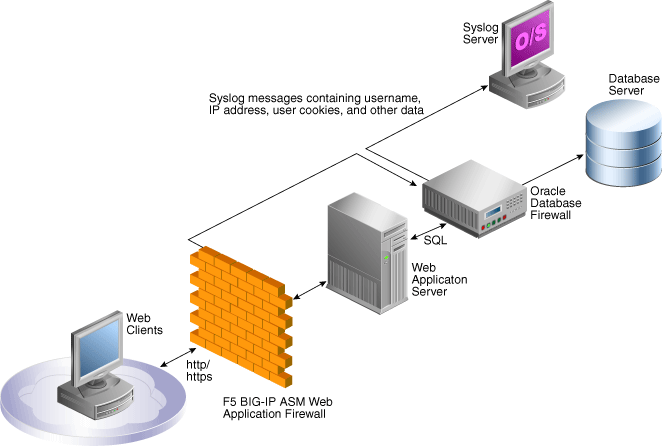
For this reason Oracle has created the the Oracle database firewall. When you deploy and Oracle database firewall  your application server is no longer talking directly to your database however to the firewall. Based upon a whitelist or blacklist principle certain statements are allowed to be send to the database. Statements that are not allowed are dropped. having such a solution in place is adding an extra layer of security to your design. An diagram showing such an implementation is shown below. 


A less known fact about the Oracle database firewall is however that it can be integrated with other security products from other vendors. F5 for example is providing a solution with the BIG-IP ASM (Application Security Manager) which is is an application layer firewall specially designed to recognise attacks on an application layer level. In most common attacks for systems where you would deploy an Oracle database firewall you will have an application layer which might only be protected by a network firewall. In a solution where you also deploy a application layer firewall you will gain an extra level of security. 

The BIG-IP ASM solution is able to detect and block an attack on the application layer and next to this forward this information also to the Oracle database firewall. This has a number of advantages. First of all the attack context is communicated with the Oracle database firewall together with information about the source-IP from the attacker and other information. Based upon the attack context the Oracle database firewall can be tightened in general and/or also on the specific IP from the attacker. 


An additional benefit, which is in my opinion a huge benefit, is that you will be able to collect the information and logs of both the F5 firewall and the Oracle database firewall in a consolidated way.  In many cases a security apartment needs to track down what happened and needs to be able to report on this and should have a trail of evidence. When multiple points of security and a multiple number of locations for logs are in place it can be very hard to track down the entire attack path and provide a consistent and correct report. Having the ability to do this from a single console is providing much more options to track and secure your vital and confidential data. When looking into securing a Oracle based solution is well worth to think about an implementation as shown above. 

Saturday, September 07, 2013

Debug PHP with Oracle DTrace

Most common users and most developers who every now and then develop an application will not be using Dtrace. however, people involved in building and debugging applications that run under Linux or Solaris and people who are responsible for tuning and optimizing performance of mission critical systems will most likely be using Dtrace or at least they should start understanding it and possibly start using it. Dtrace is a dynamic tracing framework developed by Sun Microsystems for troubleshooting kernel and application issues in real time.

Dtrace gives you the option to truley see what your application is doing and how your operating system kernel is handling stuff. A real view of what is happening can be very good when you are  diving deep into debugging applications and issues with your servers.

In the past Dtrace has primarily be used for "server" based applications and not si much for scripting languages. A not well know fact is that Dtrace is also a part of the PHP language. David Soria Parra has merged the Dtrace functions into PHP from PHP version 5.4 and onwards. The original way of using PECL to incorporate Dtrace into PHP.

If you are serious about building PHP applications and serious about finding bottlenecks in your code and the way your PHP code is interacting with your kernel you should look into Dtrace for PHP. Chritoper Jones wrote an article back in 2012 named "Adding DTrace Probes to PHP extensions" and recently wrote an article named "DTrace with PHP update" which are both good starting points. You can find both on the Oracle website in the PHP and Oracle blog from Christopher Jones.

Wednesday, September 04, 2013

Oracle Enterprise Manager for database 12c

The database has been the center of the Oracle corporation for as long as the company exists and will most likely be the core of the company for upcoming years. We see that Oracle is building more and more applications and with the merger with Sun Microsystems they are now also investing in Hardware. Within the vision from Oracle is most an end-to-end Oracle architecture and they do have most of the components now to achieve this. However, the database is still one of the core parts of the company. Oracle has strengthen the database position within the product portfolio with the release of the Oracle database 12C release which is developed for multi-tenancy and cloud computing.

Within the vision from Oracle is also that they manage the complete lifecycle of applications (and databases) and that during the full lifecycle this is managed and monitored from the Oracle Enterprise Manager application which is the center of the Oracle manageability strategy.

In the below video you can see how Oracle Enterprise Manager 12C is tying in to the Oracle database 12C product and will enable administrators to monitor and manage databases during the entire lifecycle.

The third IT wave

According to Pat Gelsinger, the CEO of VMWare we are in the third generation of IT. This was one of his statement during a recent talk. According to Pat the current wave or generation is the Mobile-Cloud Era which we are currently entering. In a way he is indeed correct and we have had the Mainframe Era, the Client-Server Era and now the Mobile-Cloud Era.

According to Pat the Mobile-Cloud Era is driven by Mobile, Cloud, Social and Big-data. We are currently only seeing the beginning of this however in the near and upcoming future this will become the default way of developing applications and running your infrastructure just like companies now primarily run there applications in a client-server fashion and in the way they where running the applications in a mainframe way before that.

Below is one of the slides used during the presentation;


Interesting is that he also noted that the new IT Mantra of this era will be / should be ÏT-as-a-Service". The mantra "IT-as-a-Service" is adding to the growing influence of the business on IT and the declining pure IT decisions. Business users and departments do get more and more involved into decisions with regards to IT and will play more and more a prominent role within IT projects and decision making. This also, autocratically, holds that the role of the CIO within a company will stay as important as it is now however it will be less "powerful" as he/she will not have the final say in IT matters as it will be heavily influenced by the other board members.

Accoording to a recent Harvey Nash study "USA 2013 CIO Survey" the role of the CIO in the new Era will be more collaborative, business-facing and multi-skilled function is shifting the dynamics of the modern-day executive table.

named high CPU usage under Ubuntu resolved

When running Ubuntu you might encounter a strange behaviour where the named process, which is part of BIND, is taking up a large amount of CPU. In my case this was more then 120% due to the fact it was using more then a single core. Normally named would take only a very small amount of the CPU cycles available so this can be seen as strange behaviour. Reason for this behaviour turned out to be a wrongly set permission on the /var/cache/bind directory.

Due to some reason the default Ubuntu distribution is shipping with only root permissions on /var/cache/bind while named is running as the user bind. The named process is trying to write to the /var/cache/bind directory however fails due to the fact that this can only be done by the root user. This in turn results in retries which take a lot of your CPU away from other processes.

To resolve this, one of, the solution is to reset the permissions on /var/cache/bind which can be done with the commands below;

chown root:bind /var/cache/bind
chmod g+w /var/cache/bind

After this you will have to stop and start bind which can be done with the below command.

service bind9 restart

This should result in a lot less CPU usage from the named process.

Monday, August 19, 2013

Oracle, hadoop and flume

The below video is created by Oracle to provide some more insight in what Oracle can offer in the field of big-data and Hadoop like / based solutions. Hadoop applications are data intensive in most cases. Reason for stating most cases is that this is not always the case as you can have a massive parallel computation on a small dataset and still use Hadoop for this due to its distribution capabilities. However, in most cases it is data intensive and Oracle being one of the major players in the database and systems fields that work with massive amounts of data it is not more then understandable that they jump on the Big-Data bandwagon. Currently Oracle is offering a big-data appliance, they do provide connectors between the Oracle database and the Hadoop platform and they are working closely with Cloudera.


One of the interesting things in the above video is the mention of Apache Flume, which is casually named however is a complete Apache project on itself.

Apache Flume is a distributed, reliable, and available system for efficiently collecting, aggregating and moving large amounts of log data from many different sources to a centralized data store. The use of Apache Flume is not only restricted to log data aggregation. Since data sources are customizable, Flume can be used to transport massive quantities of event data including but not limited to network traffic data, social-media-generated data, email messages and pretty much any data source possible.


Flume is in general used to be installed on a cluster of servers and to mine data from logfiles and send them via channels to an "data sink" in the form of HDFS (Hadoop Distributed File System). The nice thing of Flume is that it is very light wait and can be deployed on every server where you have the need to collect logfiles from and where you need them to be aggregated into your HDFS filesystem where Hadoop can start working on analysing the data. Having stated that the "data sink" is HDFS is essentially correct as you can also use "normal" flat files and custom data targets supported by custom "data sinks". For now we will use HDFS as an example. 

Flume has a straightforward design however some naming needs some understanding to understand a flume implementation. Flume consist on a high level out of data sources, flume agents, flume collectors and in our case in a HDFS storage location. This is also the way data is flowing in a Flum implementation.


A data source is in this case any file (or files that are present on the local filesystem of a host computer/server/device running flume. This can be for example a file in /var/log that you want to mine with flume. We take here as an example /var/log/messages which is generally available on all Linux systems. 

A Flume agent is responsible for collecting data from the data source and sending this to the flume collector. You can have more then one flume agent running at the same time. 

A Flume collector gathers the data from and aggregates this from one or more flume agents and send this (in our case) to the HDFS data store. 

When configuring Flume you will have to configure (primarily) your flume agent and your flume collector. What needs to be taken into account is the configuration of your sink (which is the term for where you will send your data to).

First we configure the agent and we have to set the source and sink. The source can be for example a log file in /etc/logs and the sink will be (for an agent) the agentsink which will be located on the local machine. For this you can configure a tail of the logfile you want flume to monitor. The agentsink will be a port on localhost. You can do this for example with the below command;


exec config agent 'tail("/var/log/somefile.log")' 'agentSink("localhost",35853)'

This will configure the agent to read the /var/log/somefile.log file and send the output to localhost port 35852. The collector will read the output from the agentsink at port 35853

A configuration line for the collector to collect the data (on the same machine) from this port and send it to a HDFS filesystem could be the one below (where you have to change the location of your collectorsink to a valid one).


collector : collectorSource(35853) | collectorSink("hdfs://namenode/flume/","srcdata"); 

Collector source. Listens for data from agentSinks forwarding to port port. If port is not specified, the node default collector TCP port, 35863. This source registers itself at the Master so that its failover chains can automatically be determined. A less documented feature however is that you can also provide a host in your collectorSource definition. This helps in building a single collector that is collecting from a number of agents and is sending the data to a HDFS storage location. When working with such a model it is very advisable however to look into the high availability and failover options of Flume. There are a large number of ways to implement high availability and failover for Flume and when you are implementing Flume for some mission critical solutions this is worth investigating.

On the topic of Flume Oracle has also luanched a specific video on youtube which you can view here below. Next to this there are some very good source of information available at the Cloudera website and at the Apache Flume project website

Tuesday, August 13, 2013

Technical specifications for Oracle Virtual Compute Appliance

Oracle announced today a new engineered system, the Oracle Virtual Compute Appliance. The announcement was done by wim coekaerts, the Oracle Senior Vice President for Linux and virtualization technology. The engineered system is based upon X86 processor technology and uses Oracle VM as a hypervisor technology. One of the interesting things is that Oracle states it will be supporting Windows from day one. This is next to the expected Oracle Linux, Solaris and RedHat Linux support. 

The Oracle Virtual Compute Appliance is based upon a maximum number of 25 Sun X3-2 servers as compute nodes, a 18TB ZFS storage appliance and infiniband connect solution. Next tot his the systems is equipped with a local web-based management console and a Oracle VM Manager console. It is expected that this will tie into Oracle OPSCenter and Oracle Enterprise Manager however details are still a little vague on this point.

Technical specifications of the Oracle Virtual Compute Appliance:

Compute Nodes: 2 to 25Controller Nodes: 2
  • (2) Intel 2.2 GHz Xeon (8 core) processors
  • 256 GB 1,600 MHz RAM
  • (2) 900 GB HDDs (RAID1)
  • (1) Dual-port QDR InfiniBand HCA (PCIe)
  • (1) GbE management port (BASE-T)
Oracle ZFS Storage Appliance
  • (4) QDR InfiniBand ports (one active and one passive per storage head)
  • 292 GB solid state disk write cache
  • 18 TB serial-attached SCSI (SAS) disks
  • (2) GbE management ports
Oracle Virtual Networking
  • (2) Oracle Fabric Interconnect F1-15 model with 15 I/O module slots each with:
  • (20) Non-blocking QDR InfiniBand server ports
  • (4) Quad-port 10 Gb Ethernet modules
  • (2) Dual-port 8 Gb Fibre Channel modules**Fibre Channel is included, but not supported in the initial release
InfiniBand Spine Switch
  • (36) QDR InfiniBand ports
  • (1) GbE management ports (BASE-T)
Preinstalled Software
  • Oracle Virtual Compute Appliance controller
  • Oracle VM
  • Oracle VM Manager
  • Storage Operating System Software
  • Oracle SDN

More technical specifications on the Oracle Virtual Compute Appliance can be found in the below embeded document:


A frequently asked questions document on the Oracle Virtual Compute Appliance can be found in the below embedded document


More information on the Oracle Virtual Compute Appliance can be found on this landing page at oracle.com

Monday, August 12, 2013

Social media and the influence on social

Social media by its name is implying that it is social. Social in some sense should bring people together and should help form groups. Humans are social beings by nature so social media should make us more happy. It should help us to become more happy people if we believe the implicit promise of the naming social media. For some people this might be the case and social media will help people to become more social and form groups. However, in the below video, based upon the book Alone together written by Sherry Turkle we get a look at what social media influence has on loneliness.

Some very interesting views are expressed and the video contains some warnings. Warnings to people who do adopt social media and to humanity in total. Somehow it carries the message that social media, in its current version, can be an addition to our face-to-face social life however cannot be a replacement. As social media is fairly new and our ways of doing things are already engrained in our DNA from the day we have walked the earth it is naturally we do not immediately have a fit with the new technology. Whatever your opinion and if your agree or disagree with those vies, the views in the video or the views in the book, it is an interesting thought and something interesting to discuss.


If you are interested in the book Alone together, please find an embed of the book below which is currently placed on books.google.com.