Showing posts with label database. Show all posts

Wednesday, December 30, 2015

Oracle Database Security

It might be interesting to know that the estimated value of lost business every year due to cybercrime is around a trillion dollars. Even though IT departments have been trying to ensure their systems are safe and secure and even though spending on IT security budget has doubled in the past couple of years we still see a lot of data breaches over and over again.

In the past year some notable data breaches have occurred and made the news. It is estimated that the know breaches are only a fraction of the real number of breaches in security and leakage of confidential data.

As it currently stands, companies do focus a lot on the external perimeter and defend this quite well. Having security in the lower levels, the core, of a IT footprint is however commonly not implemented. Ensuring you secure the main goal of many attacks is often not done. Oracle provides an extensive set of solutions and products which support companies to secure their database. In a recent blogpost on capgemini.com I go into the details on how the Oracle Maximum Availability Architecture can be used to secure data where it should be secured, namely, where it is created, accessed and stored; the database.


Also the above deck is providing an insight into the options to secure your Oracle database in a more advanced manner to help you protect the data it holds and prevent data breaches. 

Monday, September 21, 2015

Oracle Enterprise Manager query table space sizes

Oracle Enterprise Manager provides you the ideal solution to manage a large number of targets. All information about the targets, for example Oracle databases, is stored in the Oracle Enterprise Manager Repository database. What makes it interesting is that you can query the database with SQL and get information out of it quickly, showing you exactly what you need.

In the below example we do query the total size of the Oracle database tablesize per database. The query provides a list of all databases that are registered as a target in OEM in combination with the name of the server it is running on and the total size of the table space.

SELECT
      HOST_NAME,
      TARGET_NAME,
      round(SUM(TABLESPACE_SIZE)/1024/1024,0) AS "DB_TABLESPACE_USED"
FROM 
    MGMT$DB_TABLESPACES
GROUP BY
        target_name,
        host_name
ORDER BY 
        host_name, 
        target_name

The code is also available on github where you can find a larger collection of scripts. This scripting repository will be updated continuously so everyone is able to make use of the scripts.

Tuesday, January 06, 2015

Compile Google Protocol Buffers On Oracle Linux

Google has released a lot of code as open source software. Free for download and free to use under different open source licenses. One of the software packages released is protobuf, protobuf is google's data interchange format. Protocol buffers are Google's language-neutral, platform-neutral, extensible mechanism for serializing structured data – think XML, but smaller, faster, and simpler. You define how you want your data to be structured once, then you can use special generated source code to easily write and read your structured data to and from a variety of data streams and using a variety of languages – Java, C++, or Python.

When trying to compile RethinkDB on a Linux system you will notice that Protobuf is a prerequisite  and needs to be available. In general this is not an issue for most Linux distributions as you are able to download installation packages for it. However, when you do want to install it for Oracle Linux you will find that it is not available for Oracle Linux which leaves you with the source to compile which you need to compile to be able to use it.

As compiling is something which is generally not done by standard users and as Protobuf is something used primarily by developers do not expect everything to be as simple as you think. Some code hacking might be required to get the Google code working on your Oracle Linux machine.

During the first attempt I encountered a bug stating:
configure.ac:57: error: possibly undefined macro: AM_PROG_AR

After some hacking in the code it became clear that line 57 in configure.ac can be commented out when you encounter this issue. For some reason the macro is called and checked however not used in the rest of the code. After commenting out the line you can make and install the code without any issue.

Steps needed to get Protobuf working on Oracle Linux are the following:

1) Get the sourcecode from github.
$ git clone https://github.com/google/protobuf

2.a) Run autogen to automatically generate the config script
$ ./autogen.sh

2.b) If you run into the AM_PROG_AR issue open the configure.ac file and comment out the associated line

3)
run configure to prepare for make
$ ./configure

4)
Make the source code
$ make

5) check the make results
$ make check

6) install Protobuf
$ make install

By now you should have a completed installation of Google Protobuf. You will now be able to use it, in my case to compile the source from the RethinkDB project to create a RethinkDB instance on my Oracle Linux server.

Friday, November 07, 2014

Enabling parallel DML on Oracle Exadata

When using Oracle Exadata you can make use of parallelism on a number of levels and within a number of processes. However, when doing an massive data import the level of parallelism might be a bit disappointing at first. Reason for this is that by default not all parallel options are activated. When you do a data import you do want parallel DML (Data Manipulation Language) to be enabled. 

You can check the current setting of parallel DML by querying V$SESSION for PDML_STATUS and PDML_ENABLED as an example you can see the query below

SELECT pq_status, pdml_satus, pddl_status, pdml_enabled FROM v$session WHERE sid = SYS_CONTEXT(‘userenv’,’sid’);

this will give you the overview of the current settings applied on your session. If you find that PDML_STATUS = DISABLED and PDML_ENABLED = NO then you can change this by executing an alter session as shown below:

ALTER SESSION ENABLE PARALLEL DML;


when you rerun the above query you should now see that PDML_STATUS = ENABLED and PDML_ENABLED = YES. Now you have set this flags correct you can provide hints to your statements to ensure you will make optimal use of parallelism. Do note that only enabling parallel DML is not solving all your issues, you will still have to look at the code you will be using during your load process of the data into the Exadata. 

Wednesday, October 22, 2014

Zero Data Loss Recovery Appliance

During Oracle Openworld 2014 Oracle released the Zero Data Loss Recovery Appliance as one of the new Oracle Engineered Systems. The Zero Data Loss Recovery Appliance is an Oracle Engineered System specifically designed to address backup and recovery related challenges in the modern database deployments. It is specifically designed to ensure that a customer can always perform a point in time recovery in an always on economy where downtime result directly in loss of revenue en the loss of data can potentially result in bankrupting the enterprise.

According to the Oracle documentation the key features of the Zero Data Loss Recovery Appliance are:
  • Real-time redo transport
  • Secure replication
  • Autonomous tape archival
  • End-to-end data validation
  • Incremental-forever backup strategy
  • Space-efficient virtual full backups
  • Backup operations offload
  • Database-level protection policies
  • Database-aware space management
  • Cloud-scale architecture
  • Unified management and control 
According to the same documentation the key benefits of the Zero Data Loss Recovery Appliance are:
  • Eliminate Data Loss
  • Minimal Impact Backups
  • Database Level Recoverability
  • Cloud-scale Data Protection
Even though the Zero Data Loss Recovery Appliance brings some nice features and the key benefits and key features Oracle states in the documentation are very valid the main point is not broadcasted in the documentation. The mentioned points are in many enterprises already available in the form of self build solutions based upon a number of solutions from vendors. Backup software is in most cases Oracle RMAN or a combination of Oracle RMAN and a third vendor software solution. Hardware is commonly from different vendors, a vendor for the server hardware, a vendor for the storage and a vendor for the tape appliances.

One of the main benefits of introducing the Zero Data Loss Recovery Appliance is that it provides the perfect leverage to ensure that all backup and recovery strategies are standardized and optimized in an Oracle best practice manner. In most enterprise deployments you still see that backup and recovery strategies differ over a wide Oracle database deployment landscape.

It is not unseen that backup and recovery strategies involves multiple teams and multiple tools and scripts and that multiple ways of implementation are used over time. By not having an optimized and standardized solution for backup and recovery organizations do not have the ability to have an enterprise wide insight in how well the data is protected against data loss and a uniform way of working for recovery is missing. This introduces the risk that data is lost due to missed backups or due to a non compatible way of restoring.

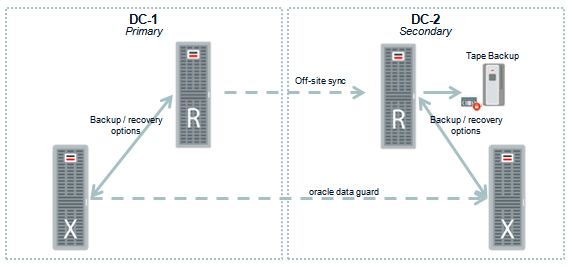
In the below diagram a dual datacenter solution for Zero Data Loss Recovery Appliance is shown in which it is connected to a Oracle Exadata machine. However, all databases regardless of the server platform they are deployed on can be connected to the Zero Data Loss Recovery Appliance.


When operating a large enterprise wide Oracle landscape customers do use Oracle Enterprise Manager for full end-to-end monitoring and management. One of the additional benefits of the Zero Data Loss Recovery Appliance is that it can fully be managed by Oracle Enterprise Manager. This means that the complete management of all components is done via Oracle Enterprise Manager. This in contrast to home grown solutions where customers are in some cases forced to use management tooling for all the different hardware and software components that make the full backup and recovery solution.

For more information about the Zero Data Loss Recovery Appliance please also refer to the below shown presentation.


Saturday, July 26, 2014

Query Big Data with SQL

Data management used to be “easy” within enterprises, in most common cases data lived was stored in files on a file system or it was stored in a relational database. With some small exceptions this was where you where able to find data. With the explosion of data we see today and with the innovation around the question how to handle the data explosion we see a lot more options coming into play. The rise of NoSQL databases and the rise of HDFS based Hadoop solutions places data in a lot more places then only the two mentioned.
Having the option to store data where it is most likely adding the most value to the company is from an architectural point of view a great addition. By having the option for example to not choice for a relational database however store data in a NoSQL database or HDFS file system is giving architects a lot more flexibility when creating an enterprise wide strategy. However, it is also causing a new problem, when you try to combine data this might become much harder. When you store all your data in a relations database you can easily query all the data with a single SQL statement. When parts of your data reside in a relational database, parts in a NoSQL database and parts in a HDFS cluster the answer to this question might become a bit harder and a lot of additional coding might be required to get a single overview.
Oracle announced “Oracle Big Data SQL” which is an “addition” to the SQL language which enables you to query data not only in the Oracle Database however also query, in the same select statement, data that resides in other places. Other places being Hadoop HDFS clusters and NoSQL databases. By extending the data dictionary of the Oracle database and allowing it to store information of data that is stored in NoSQL or Hadoop HDFS clusters Oracle can now make use of those sources in combination with the data stored in the database itself.

The Oracle Big Data SQL way of working will allow you to create single queries in your familiar SQL language however execute them on other platforms. The Oracle Big Data SQL implementation will take care of the translation to other languages while developers can stick to SQL as they are used to.


Oracle Big Data SQL is available with Oracle Database 12C in combination with theOracle Exadata Engineered system and the Oracle Big Data appliance engineered system. The use of Oracle Engineered systems make sense as you are able to use infiniband connections between the two systems to eliminate the network bottleneck. Also the entire design of pushing parts of a query to another system is in line with how Exadata works. In the Exadata machine the workload (or number crunching) is done for a large part not on the compute nodes but rather on the storage nodes. This ensures that more CPU cycles are available for other tasks and sorting, filtering and other things are done where they are supposed to be done, on the storage layer.

A similar strategy is what you see in the implementation of Oracle Big Data SQL. When a query (or part of a query) is pushed to the Oracle Big Data Appliance only the answer is send back and not a full set of data. This means that (again) the CPU’s of the database instance are not loaded with tasks that can be done somewhere else (on the Big Data Appliance).
The option to use Oracle Big Data SQL has a number of advantages to our customers, both on a technical as well as architectural and integration level. We can now lower the load on database instance CPU’s and are not forced to manual create connections between relations databases and NoSQL and Hadoop HDFS solutions. While on the other hand helps customers get rapid return on investment. Some Capgemini statements can be found on the Oracle website in a post by Peter Jeffcock and Brad Tewksbury from Oracle after the Oracle Key partner briefing on Oracle Big Data SQL.

Monday, April 21, 2014

Upgrade Oracle APEX ORA-22288 error resolved

Oracle APEX provides you a very nice and easy platform to build small (or even large) web-based applications within the Oracle APEX framework on top of an Oracle database. For developers who do want to work with Oracle APEX on their own laptop and who do not want to deploy this directly on their workstations operating system there is the option to download a complete Linux operating system with a working APEX installation. One of the things you see with downloading a virtual image is that they are not always up to the latest version and patch-level. In essence this is not an issue because you are using it as a local test and development system.

However, in some cases you might want to be on the latest version of APEX because you would like to work with some of the latest features available. Upgrading APEX is quite easy however there are some things you have to keep in mind to save you some time and some frustration.

The steps to upgrade to APEX 4.0 (and 4.*) are described by Oracle as below:

1) Download the latest version of Oracle APEX

2) Unzip the zip file, preferably in a location with a short path. For example /home/oracle

3) Change your working directory to the unzipped apex directory. For example /home/oracle/apex

4) Login to the database:
$ sqlplus /nolog
SQL> CONNECT SYS as SYSDBA
Enter Password:
SYS_Password

5) Execute the first part of the installation:
SQL> @apexins SYSAUX SYSAUX TEMP /i/

6) The previous step will log you out of the database, log back into the database as described above.

7) Execute the below command where APEX_HOME is the location of where you have unzipped the installation software (NOTE1)
SQL> @apxldimg.sql APEX_HOME

8) Execute the below command:
SQL> @apxchpwd

9) Open your browser and check if the installation was a success by opening http://localhost:8080/apex/apex_admin

In esscence these are all the steps you need to complete for your installation / upgrade of Oracle APEX to the latest version. If all is OK without any errors you could be done in a couple of minutes and ready to start developing and testing with the latest version of Oracle APEX. However, there is one small catch to it, refer to NOTE1 below which you need to keep in mind when executing step 7.


NOTE1:
The Oracle documentation states exactly the following:
SQL> @apxldimg.sql APEX_HOME
[Note: APEX_HOME is the directory you specified when unzipping the file. For example, with Windows 'C:\'.]

If you do exactly this you should be fine and everything should be running as expecting. However, you have to read the line carefully. You have to specify the location where you unzipped the file. For example /home/oracle issue is that a lot of people (me included) do not read this correctly and do think that the script will need some other scripts and for this reason you have to state the location where the installation software is located. This can be for example /home/oracle/apex. This is however incorrect.

The installation software will, at a certain point, start looking for the images it needs to load and will extend the given path with /apex/images. If you provide the wrong path (descending into the unzipped apex location) you might get the below error when executing one of the steps:

SQL> @apxldimg.sql /home/oracle
PL/SQL procedure successfully completed.
Directory created.
Directory created.
declare
*
ERROR at line 1:
ORA-22288: file or LOB operation FILEOPEN failed 
The system cannot find the path specified. 
ORA-06512: at "SYS.DBMS_LOB", line 523 
ORA-06512: at "SYS.XMLTYPE", line 287 
ORA-06512: at line 17 
Commit complete.
timing for: Load Images
Elapsed: 00:00:00.03
Directory dropped.
Directory dropped.

While, if you do it correctly you will get the below output:
SQL> @apxldimg.sql /home/oracle
PL/SQL procedure successfully completed.

PL/SQL procedure successfully completed.
. Loading images directory: /home/oracle/apex/images
Directory created.

PL/SQL procedure successfully completed.

PL/SQL procedure successfully completed.

PL/SQL procedure successfully completed.

Commit complete.

Directory dropped.
timing for: Load Images
Elapsed: 00:02:36.41
SQL>

Meaning, selecting the wrong path, and not following the instructions from Oracle to the letter, even though it is not described very clearly, might result in a situation where your upgrade/installation is not going as you might expect. 

Saturday, April 19, 2014

Oracle Database Backup Service explained

Oracle databases are commonly used for mission critical systems, in many cases databases are configured in a high availability setup spanning two or more datacenters. Even though a dual or triple datacenter is protecting you against a number of risks, like for example a fire in one of the datacenters it is not excusing you from implementing a proper backup and recovery strategy. In cases where your data is corrupted or for any other reason you need to consult a backup you will most likely rely on Oracle RMAN. RMAN used the default way for backup and recovery and ships with the Oracle database.

The below diagram shows a proper way of conducting backups. In this case all the data in database A and B is written to the tape library in another datacenter. Databases C and D write the data to the other datacenter. This ensures that your data is always at two locations. If for some reason datacenter-1 should be considered a total loss you can still recover your data from the other datacenter. For mission critical systems you most likely also will have a standby database in the other datacenter however this is not included in this diagram.

Even though this is considered a best practice it is for some companies a costly implementation. Specially smaller companies do not want to invest in a dual, or even triple, datacenter architecture. For this reason you commonly see that the data is written to tape in the same datacenter as the database is hosted and that a person is collecting the tapes on a daily basis. Or, in some worst case scenarios the tapes just reside in the same datacenter. This holds that in case of a fire the entire data collection of a company can be considered lost.

Oracle has recently introduced a solution for this issue by adding a cloud backup service to its cloud services portfolio. The Oracle database backup cloud provides an option to keep using your standard RMAN tooling, however instead of talking to a local tape library, or one in another datacenter, you will be writing your backup to the Oracle cloud. This cloud service, named Oracle Database Backup Service requires you to install the Oracle Database Cloud Backup Module on your database server. You can use the installed module as a RMAN channel to do your backup. By using encryption and compression you can ensure that your backup is send quickly and secure to the Oracle backup Service.


The above diagram shows the flow used in case you backup to the Oracle database backup service. This model is working when you have, for example, only a single datacenter. However it can also work as a strategic model when you have multiple datacenters and even if you have mixed this with cloud based hosting.

The above diagram shows how you can use the Oracle database backup service to do a cloud to cloud backup. If you, for example, host your database at Azure or Amazon and you would like to backup your data at the same backup service providers as all your other datacenters are using. Or you want to have it at Oracle to ensure your data is not with one single company, you can use the same mechanism to perform the backup to the Oracle Database Backup Service.

Creating an account at Oracle and ordering backup space is easy and can be done completely online. As you can see from the screenshot below you can order per terabyte of backup space.


One thing you have to keep in mind, as with all cloud based solutions. There are some legal considerations you need to review. When using the Oracle Database Backup Service you are moving your data away from your company and into the trust of another company. Oracle has provided numerous security options to ensure your data is safe, however, from a legal point of view you have to be sure you are allowed to move the data into the trust of Oracle. For most US based companies this will not be an issue, for US based government agencies and non-US companies it is something you might want to check with your legal department, just to be sure.

Thursday, March 06, 2014

Oracle Smart Flash Cache patching requirements

When using a PCI Express flash card in your server to enable the Oracle database to make use of the Oracle Smart Flash Cache options there are a number of things to consider. First of all, this only works when you are using Oracle Linux or Oracle Solaris as an operating system. This is commonly known, however, less commonly known is that you will have to ensure that your database is on a certain version.

Popular believe is that Oracle Database Smart Flash Cache is available and working with all Oracle database versions in an out of the box manner. However, when using Oracle database 11.2.0.1.2 or less you will have to apply database patch 8974084. To be able to apply patch 8974084 you will have at least have to applied 9654983.

When you are trying to get Oracle Database Smart Flash Cache up and running on an Oracle Database 11.2.0.1.2 or an earlier version you have to apply those patches before you start configuring this option. If the patches are not applied it will not work.

Wednesday, February 12, 2014

Oracle Database Smart Flash Cache

Oracle database has, already from release 11G the option to use Smart Flash Cache. What Smart Flash Cache enables you to do is to extend the SGA buffer cache size of your database without the need to extend your memory in your server but rather use level 2 caching options. For this you can use, for example, PCIe flash cache cards like the Sun Flash Accelerator F20 PCIe Card which is shipping from Oracle. However, other vendors do also manufactur cards that can be used to make use of this.

The below image shows what happens in essence when you are using the Oracle database Smart Flash Cache options.

  1. When a block is retrieved from the storage it is stored within the buffer cache of the system global area. 
  2. When using Smart Flash Cache a block is not removed from the buffer cache however is evicted to the flash cache instead.
  3. When a block is needed again and is not available in the buffer cache in the SGA it is retrieved (if available) from the flash cache instead.
By implementing this you can avoid, up until a certain level, recurring calls to your storage device. Requesting a block from storage is slow and if this can be avoided the benefits to the performance of your database are directly visible. Next to this, and often overlooked, is the fact that this is also resulting a positive effect for other databases and applications that make use of the same shared storage device. Due to the fact that you can lower the I/O operations on your shared storage there is more room to handle the requests from other applications and due to this there can be a positive performance gain due to this indirect relation between the components.

One good thing to keep in mind is that this option is only working when your database is deployed on Oracle Linux or on Oracle Solaris.

For more information please do have a look at the presentation on this subject which is embedded below: 

Sunday, February 09, 2014

Understanding Oracle Exadata function shipping principal

When looking at the Oracle Exadata architecture it shows a couple of things that ensures that the Exadata Database machine can provide the performance that it is known for. Numerous design decisions are note worthy however function shipping is most likely one that is the most ingenuous and is currently only available on Oracle hardware and cannot be reproduced to other hardware platforms. We do see other companies then Oracle who are building hardware platforms that are capable or providing extreme performance however non of them are able to implement the function shipping in a manner that Oracle is capable of doing.

Main reason for this is that Oracle both owns the proprietary rights on the software and the hardware included in the Exadata platform. Function shipping is, simply put, moving SQL instructions from the database nodes to the storage nodes. In the below diagram you see a common way of deploying a database in combination with the storage, which in this case is a storage appliance however this could also be local storage on the database server.

If we, for example, need to execute a select statement on the table "TBL_SALE" and retrieve all records where the "country_of_sale" is "NL" the database will retrieve all data which is in "TBL_SALE" fro the storage and when it retrieves this it will filter on "country_of_sale" and finally only show the records where this contains "NL".

In essence there is nothing wrong with this mechanism, the issue however is two folded. The first issue is that if your table is large (multi terabyte) all this data has to be moved from your storage appliance to your database instance. This can result in a serious performance loss. The second issue is that the CPU's that are busy with (A) handling all the incoming data and (B) sorting this data to verify if the "country_of_sale" equals "NL" are unable to do any other tasks.

When we look at the way the Exadata machine is developed we have a model as shown below which will mitigate against the performance loss as described above.


In the above diagram, as we execute the same query as we do on a traditional database setup. the function shipping comes into play. Instead of requesting all data from the table to be send to your database engine Oracle makes use of the function shipping principal to send the majority of the SQL execution to the Exadata storage cell. The major benefit of this that, in our example case, not the entire multi terabyte table needs to be shipped from the storage layer to the database layer. The SQL statement parts that can be executed on the storage cell will be executed right there and only the rows that satisfy the SQL select statement.

By using this function shipping the system is not providing traditional block serving services to the database but rather, in a smart way, providing options to only transfer the applicable rows and records from the storage to the database. This limits the load on the CPU's on the database server and limits the bandwidth usage between the database server and the storage appliance.

Reason that this is only available on Oracle hardware in combination with the Oracle database is that Oracle build both the hardware and the software. Due to this Oracle is able to place propriatary code on the storage cell layer wich can communicate with the database instance.

To achieve this The database servers and Exadata Storage Server Software communicate using the iDB (Intelligent DataBase) protocol. iDB is implemented in the database kernel and transparently maps database operations to Exadata-enhanced operations. iDB implements a function shipping architecture in addition to the traditional data block shipping provided by the database. iDB is used to ship SQL operations down to the Exadata cells for execution and to return query result sets to the database kernel. Instead of returning database blocks, Exadata cells return only the rows and columns that satisfy the SQL query. Like existing I/O protocols, iDB can also directly read and write ranges of bytes to and from disk so when offload processing is not possible Exadata operates like a traditional storage device for the Oracle Database. But when feasible, the intelligence in the database kernel enables, for example, table scans to be passed down to execute on the Exadata Storage Server so only requested data is returned to the database server.

Saturday, February 08, 2014

Oracle Exadata X4-2 hardware accelerated cryptographic features

The Oracle Exadata database machine is known for a lot of features, however, one of the more overlooked features is the ability to make use of some of the hardware accelerated  cryptographic features that come with the Intel processors that are in the Exadata storage cells. The Exadata X4-2 is equipped with Intel Xeon E5-2697 v2 processors who do have the AES-NI Intel data protection technology build in to them. 

"Advanced Encryption Standard New Instructions (AES-NI) are a set of instructions that enable fast and secure data encryption and decryption. AES-NI are valuable for a wide range of cryptographic applications, for example: applications that perform bulk encryption/decryption, authentication, random number generation, and authenticated encryption."

When there is a need to ensure encryption of data on an Exadata platform you can make use of the Oracle Advanced Security feature Transparent Data Encryption. The Transparent Data Encryption is also extended to the Smart Flash Cache and Hybrid Columnar Compression parts of the Exadata to ensure that there is a full encrypted storage of your data. When doing encryption in a standard way with processors that are unable to directly work with cryptography in the processor itself it might be a performance degradation, due to the fact that the Exadata platform makes use of processors that have AES-NI build in this is no longer an issue. 

What Oracle Transparent Data Encryption is doing is protecting your data against data theft on a storage level. Your data files will have to be stored somewhere on a data storage device, in the case of an Exadata these are the storage cells in your exadata. A commonly overlooked fact is that someone could potentially steel those files directly from storage or when they are moved to a backup device. 


Transparent data encryption stores all data on storage in an encrypted manner. This however, can be a hughe performance gain when done on non-optimized processors. Due to the fact that Intel has AES-NI Intel data protection technology build in to the processors directly a number of additional layers are removed from the processes that would otherwise be used to encrypt and decrypt the data coming from disk before it can be used by the database. 

Tuesday, February 04, 2014

Replicate data to Oracle database using Attunity replicate

When using a database to store data it is in some cases needed or desired to replicate the full set of data or a subset of the data to another database. In some cases this is not the same type of database which can complicate things. In many cases companies decide to create a custom build export, move and import routine. Even though this works in general there are numerous solutions that will do this task for you.

Several vendors do provide solutions to synchronize data between databases from different vendors. For architects known to the Oracle portfolio a known solution is making use of Oracle Goldengate. Less known are the solutions from Attunity. A solution for syncronizing data from a source to a target database which do not have to be from the same vendor is provided in the form Attunity Replicate. One of the big advantages from Attunity Replicate is that it is not needed to have a direct SQL connect between the source and the target system, this can be extreme valuable in cases where you might experience a lot of latency and the replication will not have to be (near) real-time.

In the below video is a short demo given on how to setup a replication of data between a Microsoft SQL server and an Oracle database by making use of Attunity Replicate.

Saturday, February 01, 2014

Amazon Redshift cloud based data warehouse service

In the era of big data and the massive collection of data by corporations there is a growing need for scalable and affordable ways of storing all data and processing data on large scale. For some of this data, which might not be that mission critical to your operations or is not that confidential a solution might be available in the cloud. More and more cloud companies do provide the option to use cloud based databases for massive data storage or in the case of Amazon Redshift a complete data warehouse service.

What Amazon Redshift in essence provide is a large scale cloud data platform based upon a columnar storage principle and which is accessible via standard JDBC and ODBC and where you can execute standard SQL commands. Amazon Redshift is an tailored implementation of the ParAccel platform. This means you can connect your standard business intelligence tooling to it to work with Amazon Redshift.

For initial loading Amazon is offering a number of options, for example, you can load data from Amazon S3Amazon DynamoDB or AWS Data Pipeline. Next to this numerous other ways, including SQL style insert batches, can be used to load your initial data into Amazon Redshift.


Even though I do not think it is a good idea to have a cloud only and by default strategy as some companies try to implement it can be a good strategy for some of your systems and some of your data. Next to the fact that you have to think about how to manage data and systems in the cloud and have to realize that there are some implications that are good and some that are bad there is also the legal side of storing your data in the cloud. This legal side might be facing some added complexity with the upcoming introduction of the European union data protection reform which will become active somewhere in 2014.

However, in the cases where you will have the option to store your data in the cloud and you are confortable with it then Amazon Redshift is a very valid choice for massive data storage for data warehousing. Amazon has provided some fairly acceptable security measures for non confidential data. For data security Amazon is currently encrypting every data block with AES-256 which is considered fairly secure even though a cryptanalysis related-key attack vulnerability has been discovered by Alex Biryukov and Dmitry Khovratovich. To speed the encryption and decryption process up Amazon is using hardware accelerated encryption to ensure this layer of security is not impacting performance (to much).

On the Amazon website a number of BI solutions have been outlined to be compatible with Amazon Redshift and should be able to connect to it to provide BI capabilities. The products currently listed and stated to be able to connect to Amazon Redshift are; Actian, Actuate, Birst, Chartio, Dundas, Infor, Jaspersoft, Jreport, Logi Analytics, Looker, MicrostrategyPentaho, Redrock BI, SiSense and Tableau. All those companies provide software that is capable of using the Amazon Redshift platform to do Business Intelligence on.

As an consultancy and implementation partner Amazon is stating Capgemini to be a preferred partner with the following quotation from Capgemini on the Amazon website; "We’re impressed with Amazon Redshift's ease of implementation, scalability to meet virtually any price point, and ability to handle the toughest big data and predictive analytics demands of our clients. In the era of Big Data and advanced analytics, we see Amazon Redshift and other AWS services, like Amazon Elastic MapReduce, as vital additions to the solutions and service offerings we provide".

A less known fact, or rather an overlooked fact, is that next to the above mentioned products you can essentially connect all BI tools to Amazon Redshift while keeping your BI processing platform on premise or somewhere in the cloud and you are NOT bound by the mentioned BI vendors that Amazon is stating. For example, it is very well possible to connect your Oracle OBIEE implementation to Amazon Redshift.
The above image comes from the rittmanmead.com website who have some interesting articles on OBIEE and how you can connect them to numerous datasources including the Amazon Redshift implementation. With Oracle OBIEE you are not bound to use a Oracle database and you can still use all the features of OBIEE.

Wednesday, September 04, 2013

Oracle Enterprise Manager for database 12c

The database has been the center of the Oracle corporation for as long as the company exists and will most likely be the core of the company for upcoming years. We see that Oracle is building more and more applications and with the merger with Sun Microsystems they are now also investing in Hardware. Within the vision from Oracle is most an end-to-end Oracle architecture and they do have most of the components now to achieve this. However, the database is still one of the core parts of the company. Oracle has strengthen the database position within the product portfolio with the release of the Oracle database 12C release which is developed for multi-tenancy and cloud computing.

Within the vision from Oracle is also that they manage the complete lifecycle of applications (and databases) and that during the full lifecycle this is managed and monitored from the Oracle Enterprise Manager application which is the center of the Oracle manageability strategy.

In the below video you can see how Oracle Enterprise Manager 12C is tying in to the Oracle database 12C product and will enable administrators to monitor and manage databases during the entire lifecycle.

Tuesday, April 09, 2013

Oracle database security blueprint against network attacks

Databases play a vital role in many current enterprise systems. They are commonly used to store vital, critical and confidential data about customers, finance, logistics and other operations within the company. Due to the central role a lot of database play in an overall architectural landscape of a company it can be expected that companies do take all measures to ensure the security of a database. Security can be seen from many different angles. For example availability is a security point which is often not considered to be part of security. When people talk about security in general they think about how to protect unwanted and unauthorised people from accessing a system or data.

When thinking about how to protect a system, a database in this case from being accessed by people who are not intended to a lot of people do think in the following order about security. User accounts, networking, applications, operating systems and then the rest. All are evenly important however thinking about security is something that needs to be taken very carefully. For example the network security is not simply placing a firewall between the database and the application server or directly to the rest of the world.

Below is a start of a blueprint which might help you to start your own database security blueprint. In this case we have taken a situation in which the database is used in combination with an application server which is connected to the public internet. A couple of things to remind, we only take network security as a topic in this blogpost and we do only think about security in a way to prevent users from attacking the database via the network to gain access. Meaning this rules out DDOS kind of attacks and this rules out any attacks on the application server (directly).

In the image below you can see the implementation of the blueprint for a database in a more then average secured landscape. This however is not yet considered a full secure architecture however is providing you security against a large number of the general attacks towards the database that might be undertaken on a web-facing application.


It is common practice for most companies to place web-facing application servers in a DMZ for security reasons. What is not common practice is that both firewalls should be of a different make and model. Reason for this is that if an attacker would be able to compromise the first firewall it would be very simple to hack the second DMZ-inside firewall when this was of the same make and model.

Next to this you can notice that the application server is attached to two different (V)lan's. Reason for this is that on the user (V)LAN you most likely only want to have one singel port open which is exactly the same port you will allow to be accessed from the outside world. Due to this setup it is important that you have at least two different NIC's. One NIC attached to the User VLAN and one attached to the application VLAN. On the application VLAN you can have more ports open then you will have on the  user VLAN. As you can see all servers in the above shown blueprint design are hardend by themselves by making also use from a local firewall. This means that even though you have firewalls available on network level you also have on every server a local firewall as an extra layer of security. On Linux servers you would use ipTables for this.

In your application design and your database schema and user design you have to already have to made sure most common security features are available. For example by making use of deep application boundary validation in your code which I already discussed in a previous blogpost.

On a more database security topic, in the blueprint design shown above you can see that the application server is not connected to the database server directly. Instead it is connected to the a database firewall server which sits in its own Oracle database firewall DMZ. The reason the Oracle database firewall is placed here is that all the other firewalls, also the Linux internal firewalls, are only there to protect against unauthorised network routing. Those firewalls simply state if a connection between 2 systems on a specified port is allowed. The Oracle database firewall is adding to this that it is checking the actual SQL statements that are executed. The Oracle database firewall is protection you against a potential attack via, for example, SQL injection. I have been discussing the Oracle database firewall in more detail in a previous blogpost.

The Oracle database firewall will be the point to which your application server will connect to like it is a normal database. The Oracle database firewall will check the statements it receive for a specific database against a whitelist of statements and if approved act as a "proxy" towards the database. This is shown in the below image from Oracle.


Now we have in place firewalls on the hosts protecting the hosts with IPtables. we also have firewalls in between the network segments and have separated the different network segments. We have also deployed a Oracle database firewall to ensure that not only the network traffic is controlled we have also ensured that the statements that are send to the database are valid and do not contain any statements that could be used to exploit the database.

As a last line of defence we use a technique that is less known even by most Oracle DBA's. We limit the hosts that can connect to the database on the database itself. In case someone is able to circumvent all firewalls and bypass the Oracle database firewall we have an option to state in the database instance itself which hosts can connect. A sort of whitelist of hosts, a sidenode to this is that you will have to add for example your application servers on this list and the Oracle database firewall. If someone gains access to a shell on those servers and starts a SQL session from this server it is considered valid. However it will hold back all the SQL sessions from IP's that are not in the whitelist.

To enable this valid node checking function you have to add some information to your $TNS_ADMIN/sqlnet.ora configuration. You have to change (add) the following to the file:

tcp.validnode_checking = YES
tcp.invited_nodes = ( X.X.X.X, hostname, ... )

Do note that if you do not add the IP's or hostnames of the machines your DBA is using they will also be unable to connect to the system. Adding the tcp.validnode_checking option to YES is in the security best practices of Oracle and should (in my opinion) be done always unless you have a very valid point to not do this.

A good thing to note is that if you use tcp.validnode_checking in an Oracle eBS setup this is supported by the autoconfig functionality. AutoConfig supports automated configuration of this setting. If the profile option “SQLNet Access” (FND_SQLNET_ACCESS) is set to “ALLOW_RESTRICTED” at the Site level when AutoConfig is run on the database server, AutoConfig will add IP restrictions to sqlnet.ora. The list of host will be all those from the FND_NODES table that are registered as an EBS node.

For more information, refer to MOS Note 387859.1: Using AutoConfig to Manage System Configurations with Oracle Applications Release 12 - or the Oracle Applications Concepts manual.

Wednesday, February 27, 2013

Oracle SQL in Eclipse

The Eclipse project started as a project for developing a development platform for Java code. Even though it is still focused arround Java a lot of additions have been build around Eclipse. Eclipse is as the project like to explain; "a community for individuals and organizations who wish to collaborate on commercially-friendly open source software. Its projects are focused on building an open development platform comprised of extensible frameworks, tools and runtimes for building, deploying and managing software across the lifecycle. "

You can find plugins for large number of languages and for a large number of development frameworks that can be enabled within Eclipse. One of the companies investing in the development of Eclipse plugins is Oracle and as Oracle is a database company they also made sure some code was donated to make Eclipse a SQL development environment. This however is somewhat unknown as Oracle mostly promotes the Oracle SQL Developer solution. However, when you only need to work on SQL code occasionally and do most of your development work in Eclipse this can be very handy. Or,... if you just like Eclipse more then you like Oracle SQL Developer.

To start using the Oracle database plugin for Eclipse you will to undertake the following steps.

Step 1:
Start Eclipse and go to "Windows" - "Open Perspective" - "Other"


Step 2:
Selecting the option from step 1 will provide you with the screen as show below. Here you can select the perspective for database development.


Step 3:
The action performed in step 2 will open a new side menu on the left side of Eclipse and will show as the "Data Source Explorer".  At the Database connections menu right-click and select New.


Step 4:
Eclipse is providing a lot of database connection types. If you have installed the Eclipse Oracle additions you will also have the option for an Oracle database. Out of the box a lot of other database connection types are also provide as you can see in the below screenshot.


Step 5:
When you have selected the Oracle database option you will be provided with the below menu where you will have to enter de connection details for this specific database connection.


When you have successfully completed the actions in step 5 and have clicked finish you should now have a working connection and the options to start developing PL/SQL code and start executing commands against your Oracle database. Below is a screenshot showing your Eclipse Oracle SQL worksheet.

Monday, February 04, 2013

Oracle database 12C DBaaS in ExaData

The new major release of the Oracle database will be Oracle database 12C which is in line with the current Oracle trend to cloudify all current products and ensure that all new products are ready for the cloud. Meaning that the anounchment  made on Oracle OpenWorld 2012 for the Oracle database 12C (Cloud) was not a supprise for the most of the attendees of the conference.

However the fact that Oracle is turing to a model for multi-tenancy in its databases is a twist not all of the attendees might have seen coming. The interesting thing might also be that it was stated that Oracle was already working on a cloud / multi-tenancy database for a long time. What was not announced specifically was that the the new Oracle database 12C will be included in the new versions of the exadata. This is to be expected however it could also have been that a specific version of 12C would be introduced to be working inside the exadata.

The current Oracle statement is the following:
Oracle Enterprise Manager 12c DBaaS is platform agnostic and is designed to work on Exadata/non-Exadata, physical/virtual, Oracle/non Oracle infrastructure(hardware and OS) platforms and it’s not a mandatory requirement to use Exadata as the base platform.

Oracle database 12C will be the Oracle foundation for Database as a Service DBaas. an interesting article by Gagan Chawala on the Oracle website is already provding some insights into how DBaaS can be developed with keeping in mind Oracle Database 12C.

Secondly the article is showing the history of the database within Oracle to show you how we came to the current point in time with the Oracle database technology.  Do find the slide screenshot below:

Next to the fact that the Oracle database 12C will be shipping in upcoming versions of the ExaData is also rumored however not confirmed officially that Oracle VM will be a part of the new versions of ExaData to provide even more options to slice and dice a ExaData and make it usable in a multi-tenancy model. Having a multi-tenancy is an outstanding request from hosting companies for a long period of time already. 

Monday, January 28, 2013

Oracle Active Session History

Within Oracle Enterprise Manager you did have an option to monitor your database top activities via a graphs. Oracle has renamed the "top activities" into Active Session History within the new release of Oracle Enterprise Manager. Also some enhancements are made to the new ASH in comparison with the "top activities" options.

The Active Session History for Oracle databases is providing you with a great tool to dive into the details of your database performance and will turn out to be a great tool to investigate user claims of bad performance. You can drill into all details for a certain moment in time to locate the reason for the bad performance of your database system.

In the below video you can get a quick overview of what the options are and this should give you a starting point to look for yourself in your own Oracle Enterprise Manager installation to find the added value of ASH.